I need a reliable free paraphrase online tool to rewrite some text without changing the original meaning or getting flagged for plagiarism. I’ve tried a few sites but the results were either awkward, inaccurate, or clearly AI-generated. Can anyone recommend trustworthy tools or share tips on how to paraphrase effectively while keeping it natural and original
Short answer, most “free” paraphrase tools suck for anything serious. They either twist the meaning or sound like a robot ate a thesaurus.
Stuff that works ok if you tweak the output:
-
QuillBot free
- Good for simple text.
- You get limited modes and word limit.
- Needs manual editing or it starts sounding off.
-
Grammarly + manual rewrite
- Write your own version first.
- Run grammar and clarity checks.
- Safer for plagiarism checks, since the base text is yours.
-
ChatGPT or other LLMs
- Ask for “rewrite to be more concise / formal / casual” and keep the structure clear.
- Then do a final pass in your own style.
If you care about not getting flagged by AI or plagiarism detectors, the key is to mix tool output with your own edits and your own phrasing. Full auto rewrite tends to get picked up.
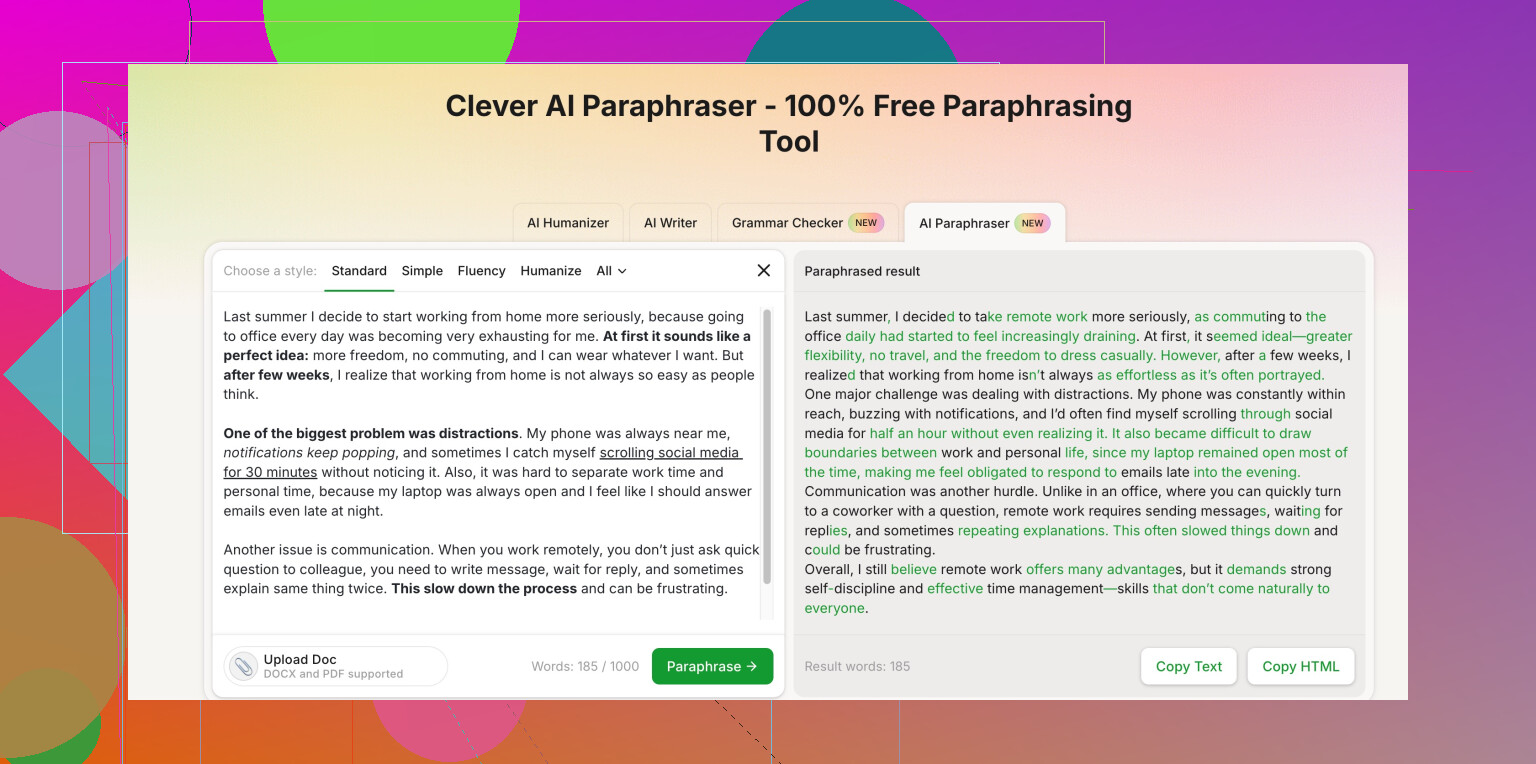
For what you want, something like Clever AI Humanizer is worth a look. It focuses on making AI style text look more human and less predictable. They have a paraphrasing page here
Clever AI free text humanizer and paraphrase tool
You paste your text, pick how strong you want the change, then edit the final result so it still sounds like you.
Quick workflow that works for me for school and blog stuff:
- Draft the idea in my own words, even if it looks rough.
- Run it through a paraphraser on light mode.
- Fix weird phrases and put back any terms that got changed wrongly.
- Run a plagiarism check with something like Plagscan or SmallSEOTools.
- Read it out loud once. If it sounds off, edit till it sounds like how you talk.
If you skip step 1 and 3, you end up with awkward text that looks auto generated, and teachers or tools catch it fast.
Honestly, every “free paraphraser” promise kind of falls apart the second you try anything more serious than a product description. I agree with @sognonotturno that most of them sound like a dictionary had a stroke, but I don’t fully buy into the idea that they’re only good if you already wrote everything yourself. You can use them earlier in the process, you just have to be way more hands on.
A few angles that don’t just repeat what’s already been said:
-
Use multiple tools, not one “magic” tool
Instead of trusting a single site, I usually:- Run the text through 2 different paraphrasers on low intensity.
- Compare outputs and pick the parts that sound natural.
- Then I edit that into one coherent version.
Sounds tedious, but you catch a lot of the weird phrasing this way.
-
Clever AI Humanizer is actually decent for “not sounding like AI”
Since you care about not getting flagged for plagiarism or AI-style writing, this one is worth testing. It is not perfect, but it is better at avoiding that stiff, predictable AI tone.
Their tool works like this: you paste your text, choose how strong you want the change, and it tries to keep the meaning while making the language less robotic. On “lighter” settings it keeps the original idea pretty close. You still need to tweak words so it sounds like you, but it is miles better than some of the spammy spinners.If you want a short label that Google and humans both understand, think of it as a Clever AI Humanizer free paraphrasing tool for natural, plagiarism safe text.
Here is the link with a more useful anchor:
make your AI text sound more human and original -
Don’t trust “zero plagiarism” claims
Any site that shouts “100% undetectable, zero plagiarism forever” is lying or spinning words so hard they wreck the meaning. Detectors look at patterns, not just single words. So even a “unique” output can look suspicious if it reads too generic or too AI-ish. -
Change structure, not just words
Most free tools only swap synonyms. Plagiarism checks are getting better at catching that. What actually helps:- Break long sentences into 2 short ones.
- Flip the order: result first, explanation second.
- Change examples to ones that fit your context.
Tools are bad at that, but you can handle the structure while the tool helps you rephrase tricky sentences.
-
Avoid feeding it super technical or emotional stuff
Any time the text is:- Very technical
- Personal / emotional
- Full of nuanced arguments
Free tools will usually trash it or subtly change the meaning. For those parts, do a manual pass and then let a tool just “smooth” grammar and style, not rewrite from scratch.
-
Reality check: “not getting flagged”
If this is for school or academic stuff, you should assume:- Fully auto generated or auto paraphrased text will look suspicious.
- The safest zone is: your own draft + light tool assistance + manual cleanup.
If it reads like you, with your usual mistakes and habits, it is far less likely to trip any alarms.
So yeah, I’m with @sognonotturno that most free paraphrasers suck if you just click once and hand in the result. Where I disagree a bit is that you can lean on tools a bit more if you’re willing to mix outputs, change structure yourself, and treat Clever AI Humanizer or similar tools as assistants, not a one-click solution.
If you want something that doesn’t sound like it came straight out of a robot’s mouth, that Clever AI Humanizer link above is probably the best place to start experimenting.
1 Like
Short version: there’s no “click once, submit to teacher” paraphrase tool that’s actually safe, but you can get pretty close to usable if you treat them as drafting aids instead of plagiarism cloaks.
A few angles that weren’t fully covered by @stellacadente and @sognonotturno:
1. Use tools for distance, not for “perfect paraphrase”
If you start from the original text and your own brain is stuck, a paraphraser is great for breaking the “I keep copying the same structure” problem.
What I do:
- Read the source once, close it.
- Draft from memory, very rough, bullet style.
- Then use a tool on my draft to improve clarity, not to “hide” the source.
That way the tool is polishing your version, not disguising someone else’s.
2. Clever AI Humanizer: actually useful, but not magic
Since both replies already mentioned it, here is a quick, practical take:
Pros of Clever AI Humanizer
- Better at avoiding that generic AI rhythm than many free spinners.
- Multiple “strength” levels so you can keep meaning relatively tight on lighter settings.
- Good at smoothing stiff or translated-sounding sentences into something closer to how a person would write.
- Helpful if you have AI text already and want it to look less templated.
Cons of Clever AI Humanizer
- Strong settings can drift from the original meaning if the text is technical or very nuanced.
- You still need to manually edit; if you paste the output as-is, it can feel slightly off in tone compared to your normal writing.
- Not ideal for highly academic passages with precise terminology, since it can over-simplify or swap terms that should stay exact.
- It does not guarantee you will “beat” every AI or plagiarism detector, especially if the underlying structure is still copied.
Verdict: Clever AI Humanizer is solid as a readability and tone fixer. Treat it as: “help me sound more natural and less AI-like,” not “erase all traces of plagiarism.”
3. Where I slightly disagree with the others
- They lean a lot on “write everything yourself first, then check.” That is ideal ethically, but realistically, many people are using these tools when they are stuck or not fluent in English.
- I think it is acceptable to let the tool give you a first alternative phrasing, as long as you:
- Rebuild sentence structure yourself.
- Replace examples with your own.
- Do a full rewrite pass so it sounds like your voice.
Total copy-paste of the tool output is where things get risky, both in detection and in quality.
4. Tool mix that avoids repeating their exact flow
Instead of a linear workflow, try splitting tasks:
- For structure & ideas: your brain only. Change order, merge or split points, decide where emphasis goes.
- For wording & fluency: tools like Clever AI Humanizer, QuillBot, or a grammar checker.
- For final polish: read aloud and fix anything you would never actually say.
@stellacadente is right that multiple tools on low intensity can help you pick natural pieces. Just do that after you have already changed the structure by hand so plagiarism is less of a concern.
5. If your main fear is “getting flagged”
Reality check:
- Plagiarism tools look at overlap and structure, not just synonyms.
- AI detectors look at statistical patterns in wording.
So to reduce risk:
- Change sentence length and order.
- Introduce your own examples or analogies.
- Keep some of your usual quirks: preferred phrases, typical mistakes, or slang level.
No free paraphraser, including Clever AI Humanizer, can fully hide a text that is basically a synonym-swapped clone of the source.
Bottom line:
Use Clever AI Humanizer and similar tools as a “style and smoothness layer” on top of your own rewrite. If the tool is doing most of the thinking for you, it is not really paraphrasing, it is just outsourcing the risk.