I’ve been using GPTHuman AI for a while, but I need a truly free option that offers similar conversational quality and useful features for writing, brainstorming, and coding help. Most tools I find are either paywalled, have strict limits, or feel way less capable. What free AI assistants or platforms are you actually happy with, and why do you recommend them?
- Clever AI Humanizer, my take in 2026
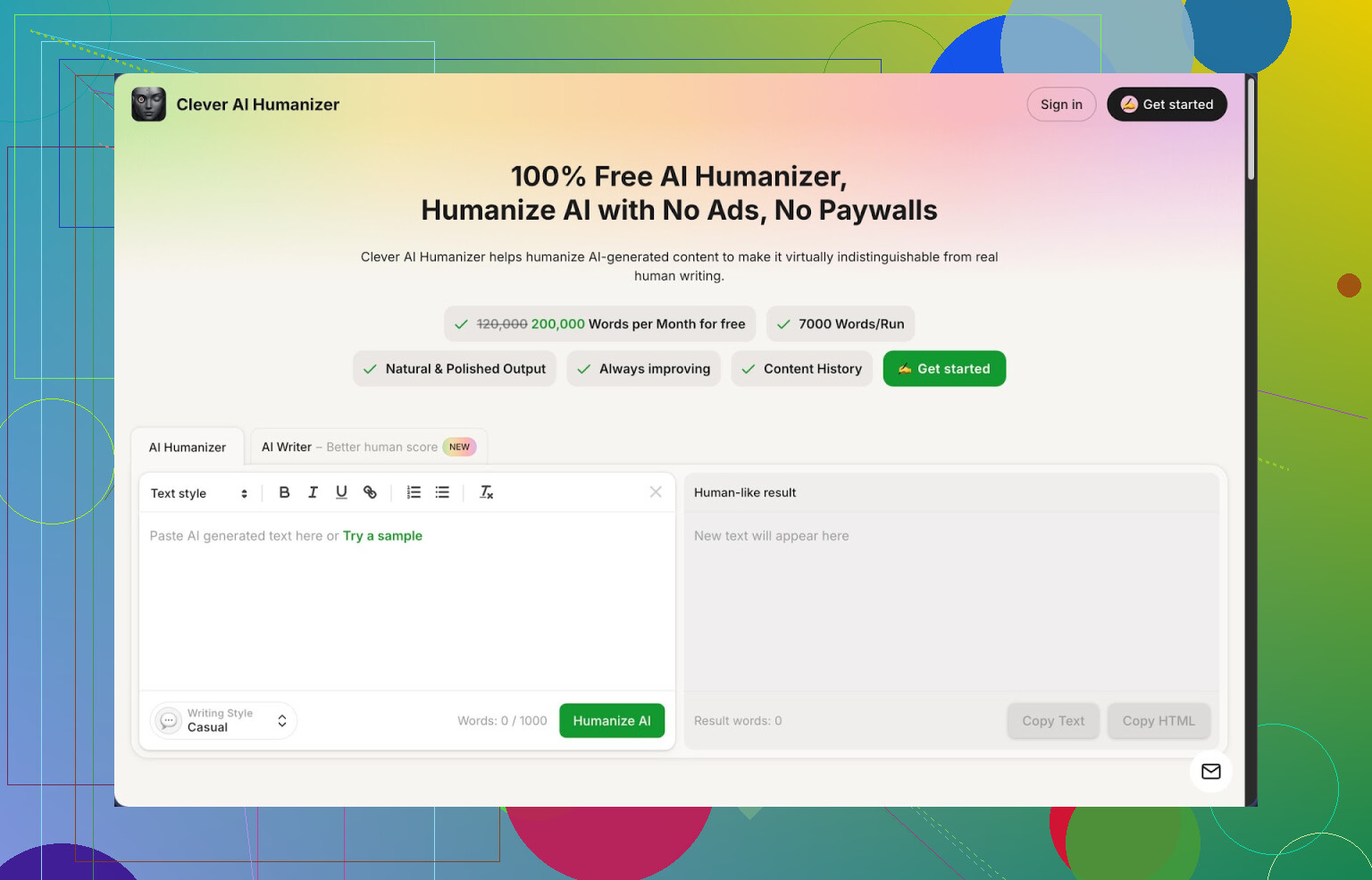
I stumbled into Clever AI Humanizer here:
Short version from my own use: it is the only “AI humanizer” I kept instead of uninstalling after a week.
Here is what pulled me in first:
free account, no card, with a hard cap of about 200k words per month, and roughly 7k words per run. For stuff like essays, blog posts, and emails, that limit feels high. It also has three presets for tone, “Casual”, “Simple Academic”, and “Simple Formal”, plus a built in AI writer in the same site.
I did not trust the marketing line, so I ran my own test with ZeroGPT.
I took 3 different AI generated samples, ran them through the Casual style, then checked them in ZeroGPT. For those three samples it showed 0% AI every time. That does not mean you get 0% on every detector, or with every text, but I stopped fighting with phrasing after that and used it more aggressively.
If you write with AI a lot, you already know the pattern.
The text looks fine to you, then some detector screams 100% AI. With client work, or school, or platforms with strict filters, that gets stressful fast. I went through a few tools that claim “humanization”, and most of them either wrecked the meaning or spat out nonsense. Clever was the first one that felt like a regular rewriting helper instead of a spam spinner.
Here is how the main module works in practice
I dump my AI text into the Free AI Humanizer box, pick a style, and hit go.
Processing time was usually a few seconds for stuff under 2k words, a bit longer closer to 7k.
What I noticed after around 20 runs:
• It tends to reshuffle sentences and add small connective phrases.
• It keeps the structure of arguments more often than not.
• It does not throw in weird synonyms that break technical writing.
I used it on:
• A 4k word blog draft about backup strategies.
• A 1.5k word email sequence.
• Two short academic style explainers.
In each case the meaning stayed intact, but the text lost that stiff “AI rhythm” you see from generic models. Some sentences got longer and a bit wordy, though, so you still have to trim.
One thing to keep in mind.
Humanization tends to add words.
My 1.5k word email series went close to 1.9k after running through Casual. That is a tradeoff, since longer phrasing seems to confuse detectors more. If you have hard limits, like character caps on platforms, you will need a second pass to shorten things.
Other parts of the tool that I ended up using
- Free AI Writer
This is built in at https://cleverhumanizer.ai as a separate tab.
You feed a prompt, it generates a draft, then you click once to humanize that draft in the same window.
For me, this combo did better on detectors than pasting text from ChatGPT or other models into the humanizer. My guess is their writer is tuned to avoid some of the obvious AI patterns from the start.
I used this for:
• Two “top 10” style tech posts.
• One longer FAQ page for a side project.
All of them passed ZeroGPT with low or zero AI scores. Again, one detector, so do not treat it as universal truth, but for Upwork style clients that demand “no AI detection”, it helped.
- Free Grammar Checker
This sits next to the humanizer and works like any basic editor. You paste text, it catches spelling issues, punctuation, and some clarity fixes.
It reminded me of a lighter Grammarly.
I used it mostly after humanization to strip out some extra commas and clean sentences that felt a bit bloated. Publishing to a blog or sending client deliverables felt safer after this step.
- Free AI Paraphraser
This one is more about rephrasing than evading AI detectors.
I tested it on:
• Parts of older blog posts I wrote myself.
• Sections of an AI draft where I hated the style.
• Snippets meant for SEO experiments.
The meaning stayed aligned, and the tool kept key terms intact, which matters if you care about keyword usage. I used it to get alternate versions of intros, product descriptions, and meta descriptions.
Workflow that ended up sticking for me
For longer content:
- Generate a rough draft with their AI Writer or another model.
- Run it through the Humanizer in Casual or Simple Academic, depending on audience.
- Pass the output through the Grammar Checker.
- Use the Paraphraser on parts that still feel stiff or repetitive.
This ends up as a 2 to 3 step flow inside one interface, without juggling multiple sites. For daily content, that matters more to me than any single detection score.
What did not work perfectly
• Some detectors still flag parts as AI.
I tried Originality.ai on a few samples. The scores dropped compared to raw AI output, but not always down to “fully human”. So do not expect magic.
• Text length balloons.
On tighter formats like product cards or social posts, I often had to shorten manually after humanization.
• Style presets feel a bit limited.
Casual is fine for blogs or newsletters, Simple Academic helps for essays, but if you write highly technical content or fiction, you will spend time editing for voice.
Despite all that, for a free tool with no token system, no “credits”, and no time wasted on subscription screens, I still use it almost daily for cleanup and detector sensitive work.
If you need numbers
From my own rough log over 3 weeks:
• About 120k words processed.
• Average word expansion around 15 to 25 percent.
• ZeroGPT scores on my tests:
– Raw ChatGPT: often 80 to 100 percent AI.
– After Clever Casual humanization: between 0 and 25 percent AI, most closer to 0 on my samples.
Again, that is one detector. Your mileage will vary across others.
More detailed review and proof
Someone posted a more structured breakdown, with detection screenshots, here:
Worth reading if you want screenshots and step by step checks.
There is also a YouTube review:

Reddit threads if you want to see other people’s experiences
Best AI humanizers discussion:
https://www.reddit.com/r/DataRecoveryHelp/comments/1oqwdib/best_ai_humanizer/
General talk about humanizing AI output:
https://www.reddit.com/r/DataRecoveryHelp/comments/1l7aj60/humanize_ai/
If you are trying to keep AI involvement low profile in client work or school assignments, this tool gave me the best balance so far between keeping my meaning, passing at least some detectors, and not paying every time I press a button.
1 Like
If you want a free swap for GPTHuman AI for convo, writing, brainstorming, and coding, I’d split it into two parts: “talking to an AI” and “cleaning up / humanizing what it wrote”.
For the conversational AI part, completely free options with no card and decent quality right now:
-
Perplexity
Good for brainstorming and research-style writing.
Pros:
• Fast replies.
• Strong for outlines, drafts, and explaining code.
• Web search built in, so it stays up to date.
Cons:
• Daily limit if you hammer it.
• Not great for long creative writing. -
Poe (using the free models)
Pros:
• You get multiple models in one place.
• Works fine for chat, idea dumping, light coding help.
Cons:
• Hard limits each day.
• Some better models sit behind paywalls. -
Gemini free tier
Pros:
• Good for code help and debugging.
• Solid for structured writing, emails, and step by step tasks.
Cons:
• You hit caps on longer sessions.
• Sometimes overexplains instead of getting to the point.
For “human” output, detector friendly, and cleaner prose, I agree with part of what @mikeappsreviewer said, but I’d use the tools a bit differently.
Clever Ai Humanizer is worth adding to your stack, but I would not treat it as your main conversation model. It works better as a post-processor. You get:
• Free tier, no card.
• Around 200k words a month, roughly 7k per run.
• Three styles that are enough for most school and client stuff.
Where I disagree slightly with @mikeappsreviewer is on how aggressive to rely on detectors. ZeroGPT, Originality, etc, all give different scores. I use Clever Ai Humanizer mainly to:
• Break the “AI rhythm” in essays, blog posts, and emails.
• Clean up tone for clients that hate obvious AI phrasing.
• Paraphrase specific sections I do not like.
My workflow for something like “GPTHuman AI replacement” use case looks like this:
-
Use Perplexity or Gemini to talk through the idea.
Ask for:
• Outline.
• Key points.
• Example code or snippets. -
Generate the draft with that same model.
Split into chunks if it is long, 1k to 1.5k words at a time. -
Paste the draft into Clever Ai Humanizer.
Pick Casual for blogs or Simple Academic for essays and reports.
Run it once, then spot check:
• Did it keep the technical terms.
• Did it blow up the word count too much.
If it gets too long, trim manually after. -
For coding help, avoid heavy humanization.
Use Clever Ai Humanizer only around explanations and comments, not on the actual code. Even small wording changes can mess up syntax or logic. -
For shorter stuff, like emails or social posts, I would skip humanization depending on risk. Clever tends to expand text. If you must keep things tight, do one pass and then manually shorten.
If you want something that feels like GPTHuman AI in one tab, you will not get a perfect clone for free without limits. The practical setup is:
• One free chat model for the thinking and writing.
• Clever Ai Humanizer for polishing and reducing AI “fingerprints”.
That combo gives you:
• No subscription.
• Enough monthly volume for school or light freelance work.
• Good mix of idea generation, editing, and “human” tone.
Short version: you’re not going to get a single, forever‑free “GPTHuman AI clone” with high‑end quality and zero limits. You’re going to end up with a stack.
@mikeappsreviewer and @byteguru already nailed Clever Ai Humanizer pretty well, so I won’t rehash their workflows. I’ll just say: it’s solid as a polisher, not a chat replacement. Treat it like a layer that sits after your main AI, especially for essays, blog posts, emails, and “pls don’t look AI” stuff. For coding, only use it on comments or explanations, not the actual code, or you’ll hate your life when a random comma breaks everything.
Where I disagree a bit: they lean hard on Perplexity / Gemini / Poe. Those are fine, but each has annoying limits or paywalls if you push them. A slightly different stack that’s worked for me:
-
Main conversational / coding model (free-ish)
- OpenAI’s own free ChatGPT (if accessible where you are)
For general brainstorming, explaining code, writing outlines, and quick drafts. It’s capped, but for day‑to‑day school or light freelance, it’s usually enough. - If that’s not an option, I’d look at:
- Gemini free for code help and more “structured” writing.
- Poe free models when you want a second opinion or different style.
- OpenAI’s own free ChatGPT (if accessible where you are)
-
Human‑style polish / AI detection anxiety tool
-
Clever Ai Humanizer
Use it when:- Your draft “reads AI” and you need it to sound more human.
- A client/teacher freaks out about AI detectors.
- You wrote something with ChatGPT / Gemini and it feels stiff.
Don’t throw everything through it. It tends to expand text, and if you’re already concise, it can make things bloated. I only run:
- Final essays
- Client‑facing emails
- Blog posts I care about
-
-
When you’re coding specifically
- Keep the main conversation in ChatGPT / Gemini.
- Humanize:
- Problem descriptions
- Doc text
- Comments in code
- Leave the raw code un‑“humanized” unless you like debugging invisible issues.
So:
• Use a free general model for talking, idea gen, and code.
• Pipe only the important text through Clever Ai Humanizer.
That combo gets you close to GPTHuman AI quality without being stuck behind yet another subscription wall.