I accidentally formatted an external hard drive that had important photos, work files, and personal documents on it, and I need help figuring out if the data can still be recovered. I stopped using the drive right away and want advice on the best hard drive recovery steps, software, or professional options before I make things worse.
I used to think a formatted drive was finished, end of story. After dealing with wiped externals, broken partitions, and a pile of recovery attempts, I don’t see it that way anymore. A format looks bad, sure. Still, in a lot of cases, your files are sitting there until new data lands on top of them.
First thing, stop touching the drive.
If it’s an external disk, unplug it. If it’s your main system drive, don’t install apps, don’t download random stuff, don’t copy files around. Every new write lowers your odds because old file data gets replaced piece by piece.
One part people miss, not all formats hit the same.
Quick Format vs Full Format
-
A Quick Format usually strips out the file system records. Your computer sees an empty drive, but the file content often stays on the disk until something else overwrites it.
-
A Full Format is rougher. On newer Windows versions, it writes across the drive and checks for errors. Once sectors have been overwritten, software recovery won’t pull the old files back. So yeah, recovery odds are usually far better after a Quick Format.
1. Check backups before doing anything fancy
I’d start here every time because people forget what was syncing in the background.
Look through OneDrive, Google Drive, or iCloud. Check trash folders and recently deleted sections too. On Windows, look at File History if you had it on. This takes a few minutes and saves a ton of wasted scanning if your files are already sitting in a cloud bin with names and folders intact.
2. Try recovery software
If there’s no backup, this is where I’d go next. For a plain formatting mistake, software is usually the first real move.
I’ve had decent results with Disk Drill. It works on Windows and Mac, supports formatted drives, and it tends to pick up files even when partition info is trashed or missing.
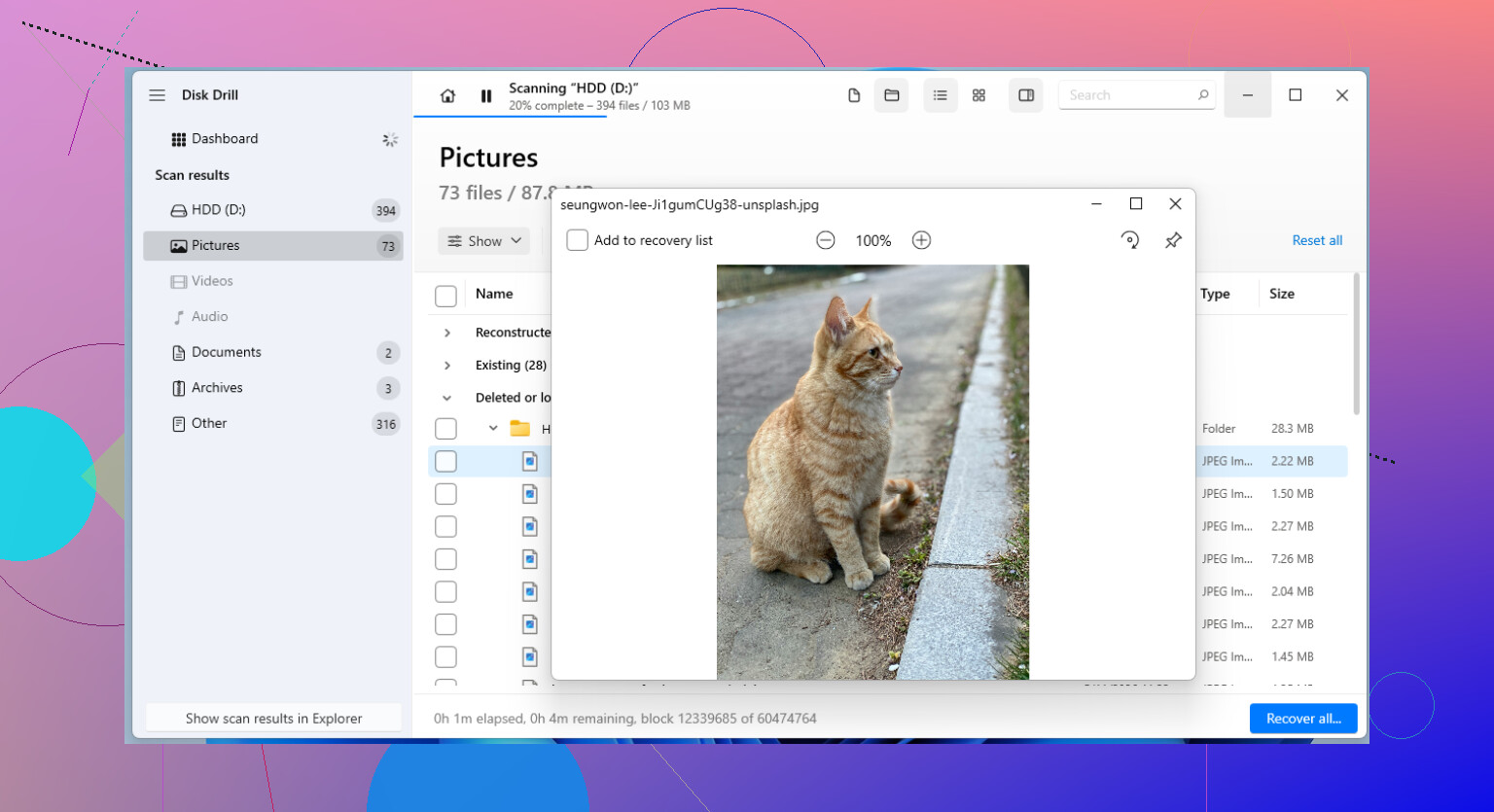
Basic flow:
-
Install Disk Drill on a different drive, not the formatted one.
-
Run a scan on the formatted drive.
-
Look through what it finds and preview files when possible.
-
Save recovered files to another disk.
The preview step matters more than people think. I’ve seen scans return thousands of filenames, then half of them were damaged. If a file previews cleanly, your odds are better.
3. Go to a recovery lab if the files matter more than the bill
If software comes up empty and the data is something you can’t replace, I’d stop there and hand it off to a professional lab.
This is the route for stuff like company records, legal files, tax archives, old family photos, things you don’t get a second shot at. Labs have tools and hardware normal users don’t. It costs more, sometimes a lot more, but for certain cases I’ve seen people take the hit because the files mattered more than the drive.
If you formatted a drive by accident, don’t keep using it and hope for the best. Stop writes right away. Then check backups. After that, use recovery software. The big split is Quick Format versus Full Format, and speed matters. The longer you keep writing to the drive, the worse your chances get. simple as that, typo and all.
1 Like
Yes, your data still has a shot if the format was quick and you stopped using the drive fast. That part matters most.
One small disagreement with @mikeappsreviewer. People treat ‘full format’ like an automatic death sentence. On modern Windows, yeah, odds drop hard. On some older setups, or if the format got interrupted, I would still test recovery before giving up. I’ve seen wierd cases where files were still there in pieces.
What I’d do next:
-
Check the drive health first.
If the external drive is clicking, disconnecting, or showing 0 bytes, stop with software tests. That points more to hardware trouble than a simple format issue. -
Make a byte-for-byte image of the drive.
This matters more than most people realize. Work from the copy, not the original. Tools like ddrescue on Linux are great for this. If the scan goes bad or the drive gets worse, you still have one clean shot left. -
Scan the image with recovery software.
Disk Drill is a solid pick here because it handles formatted drives well and its file preview helps filter junk from real recoverable files. Save anything recovered to a different disk. Never back onto the same external. -
Sort results by file type first.
Photos and docs often recover even when original folder names are gone. JPG, PNG, DOCX, XLSX, PDF, and RAW photo files usually give you the best first pass.
If you want a plain-English look at Disk Drill for formatted drive recovery, this Disk Drill recovery walkthrough for formatted hard drives is easy to follow.
If the files are business-critical or family photos you can’t replace, skip the expermients after the first failed image/scan attempt and send it to a lab. Repeated rescans on a dying drive are how people make a bad situtation worse.
If you stopped using it right away, your odds are still decent. That part matters more than people think.
I mostly agree with @mikeappsreviewer and @codecrafter, but I’d add one thing people skip all the time: check whether the drive was reformatted to a different file system. If it went from NTFS to exFAT, HFS+, APFS, etc, some tools will show a mess of raw files unless they specifically handle formatted partition recovery well. That’s where Disk Drill is usually worth trying first, because it tends to do a better job reconstructing files from formatted external drives than a lot of bare-bones free tools.
Also, don’t trust the first scan result too much. Run one deep scan, preview actual photos/docs, then recover only the important stuff first. Start with irreplaceable files, not the giant movie folder you can re-download later. Sounds obvious, but ppl panic and do the opposite.
One small disagreement with the “just keep trying tools” approach: too many recovery attempts can waste time and sometimes stress a flaky external drive. If the disk is slow, vanishing, or making noises, stop DIY stuff.
For extra reading, this is a solid roundup of more tips for formatted disk recovery and hard drive recovery software.
Short version: yes, recovery is possible after an accidental format, especailly if it was quick format and you stopped immediately. Use Disk Drill from another drive, recover to a different disk, and if the data is truly priceless, go pro before you make it worse.
One thing I’d add to what @codecrafter, @stellacadente, and @mikeappsreviewer said: check whether this is an HDD or SSD inside that external enclosure. If it’s an SSD, TRIM can make recovery a lot worse after formatting, sometimes fast. If it’s a spinning hard drive, recovery odds are usually better as long as you stopped writing.
I also slightly disagree with the idea that more scanning is always harmless. On a healthy drive, fine. On a marginal one, repeated deep scans can be a bad trade.
For Disk Drill specifically:
Pros
- Good at finding files after quick formats
- File preview helps separate real recoverable stuff from junk
- Friendly enough for non-tech users
Cons
- Deep scans can be slow
- Raw recovery may lose original names/folders
- Best results usually mean using another drive with enough free space
My angle: recover the most valuable file types first, then stop and verify them. Don’t wait until the end to discover all the photos are corrupted. A few recovered, openable samples tell you way more than a giant scan list. If recovered JPGs open and documents pass preview, keep going. If everything comes back broken, reassess before hammering the drive further.
If the drive was encrypted at any point, that changes the whole game too.