My Canon camera suddenly showed a memory card error, and after I checked the card, a bunch of important photos were missing. I haven’t taken any new pictures since then because I’m worried about overwriting them. I need help figuring out the best way to recover deleted Canon photos from an SD card after a card error.
There’s a decent shot your Canon photos are still there. The first thing I’d do is stop using the SD card, full stop. Once images get deleted, they often sit on the card until new data lands on top of them. So the big factor is simple. What happened after you erased them?
If you noticed the mistake right away and quit shooting, recovery odds are usually decent. If you kept going and filled the card with another batch of photos or video, the situation gets messy fast. I’ve seen some files return fine, others come back half-broken, and some vanish.
This is the order I’d follow.
Take the SD card out of the camera. Use a card reader if you have one. I would not plug the Canon in and poke around from there unless you have no other option. If your computer throws up a format warning, ignore it. Same for CHKDSK, First Aid, or any repair prompt. Those tools are for fixing a volume, not for protecting deleted images.
After that, run a recovery scan on the card. If I had to pick from the usual tools, I’d line them up like this:
- Disk Drill. This is the one I’d try first. It handles common photo types and RAW files well, preview helps a lot, and the process feels less annoying.
- Recuva. Fine for simple deleted-photo jobs on Windows. It feels older, and I’ve had mixed results with newer formats.
- Data Rescue. It works, though I found the flow a bit clunky.
- UFS Explorer. Good when the easy tools fail. It asks more from you, so I wouldn’t point a casual user there first.
One rule people mess up all the time. Save recovered files to your computer or a different external drive. Don’t write them back onto the same Canon SD card. If you do, you risk stomping on the stuff you’re still trying to rescue.
Also check the boring places before you spend an hour scanning. Recycle Bin, Mac Trash, Time Machine, File History, cloud backups, and Canon image.canon. If those photos were imported, synced, or copied earlier, you might pull them back from there and skip card recovery entirely.
So yeah, there’s hope. Stop using the card, scan it with a proper tool, preview what turns up, and restore the files somewhere else. After a scare like this, I’d set that SD card aside for a while. Mine would be in timeout lol.
1 Like
Yes, your odds are still decent since you stopped shooting right away. That part matters most.
I agree with @mikeappsreviewer on one thing, keep the card out of the camera. I slightly disagree on rushing straight into repairs or assuming the card is only a file deletion issue. A Canon “card error” often points to file system damage, bad sectors, or a card starting to fail. If the card is unstable, the safer move is to make a full byte-for-byte image of it first, then scan the image, not the card itself. Fewer reads, less risk. A lot of people skip this and regret it.
What I’d do:
- Put the SD card in a reader.
- If the computer sees it, clone or image the card first.
- Run recovery on the image.
- Save recovered photos to your computer, not back to the SD card.
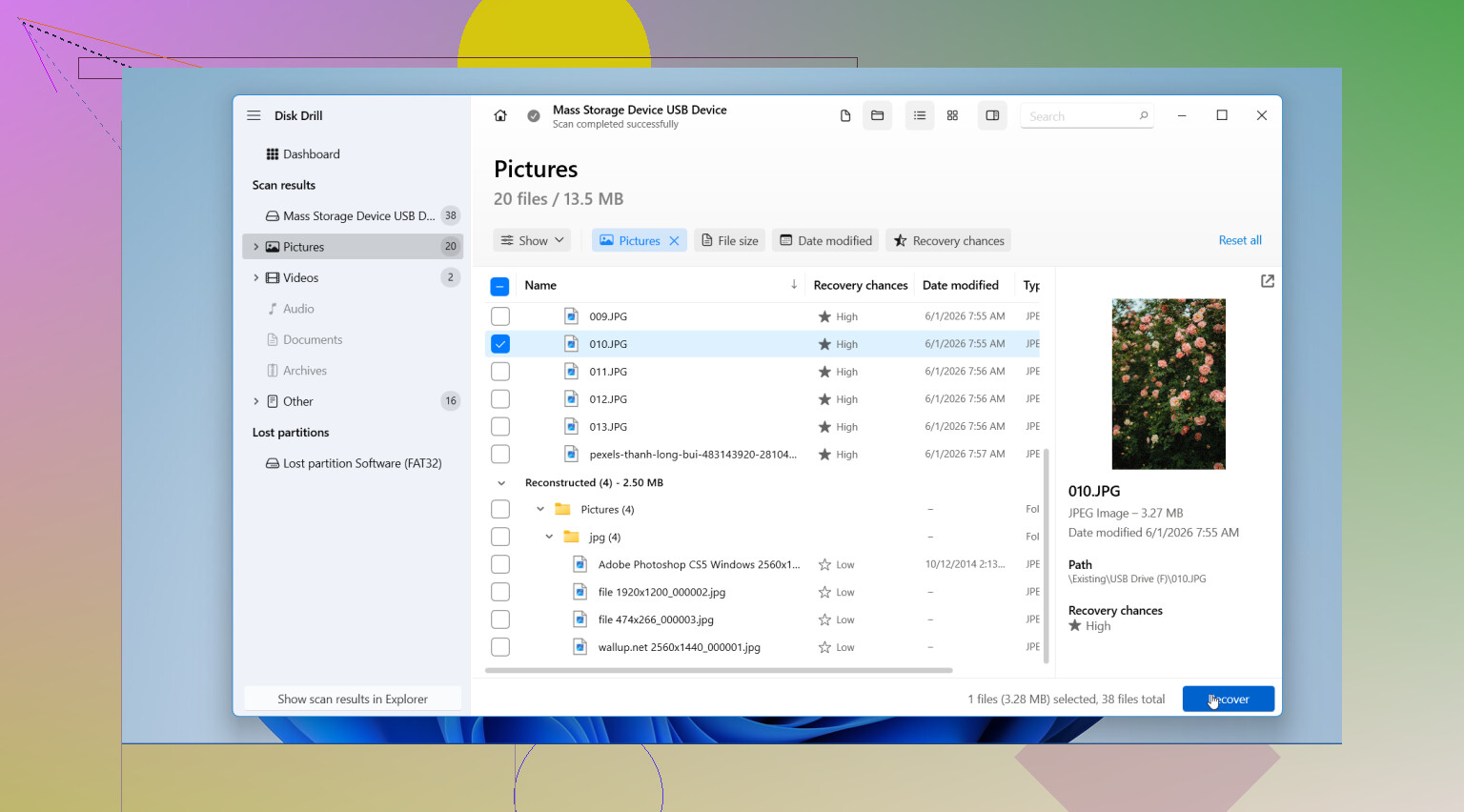
If you want the easy route, Disk Drill is a solid first pick for Canon JPG and RAW recovery. If the card keeps disconnecting or throws read errors, switch to imaging tools before anything else. If the card is not detected at all, software gets iffier fast and a pro recovery shop starts making more sense.
Also check whether your Canon wrote sidecar or hidden folders the camera menu no longer shows. I’ve seen “missing” photos still present but ignored by the camera.
For more user reports on camera SD card photo recovery tools, this thread is useful:
best photo recovery software for Canon SD cards on Reddit
If the photos matter a lot, stop now and image the card first. Don’t poke at it too much. One bad reader or one failed repair pass messes stuff up fast.
Since you stopped shooting, your chances are probly still pretty solid. That was the single smartest move.
I mostly agree with @mikeappsreviewer and @codecrafter, but I would add one thing people overlook with Canon cards after an error: sometimes the photos are not truly deleted, the directory just got scrambled. In that case, file recovery is one path, but checking the card for DCIM structure issues from a computer can also reveal files the camera stopped listing. Not glamorous, but it happens.
What I would not do:
- don’t format the card, even if Canon asks
- don’t run Windows repair or macOS disk repair first
- don’t keep testing it in the camera over and over
What I would do:
- use a decent card reader
- if the card mounts, copy anything still visible immediately
- then scan it with recovery software
Disk Drill is a reasonable choice here because it tends to do well with Canon JPG, CR2, and CR3 recovery, and the preview function helps you figure out fast whether the missing stuff is actually recoverable or just ghost entries. If the card starts disconnecting or reading super slow, stop messing with it and consider a disk image before more scans.
One small disagreement with the “just recover and move on” mindset: if this card threw a memory error once, I would retire it after this. SD cards are cheap. Lost photos are not.
Also, if you want a simple easy SD card file recovery guide, that gives a decent quick overview.
Short version: yes, deleted or missing Canon photos can often be recovered after a card error, especially if you haven’t written anything new. Check visible folders first, recover to a different drive, then replace the card becuase I wouldn’t trust it again.

I’m with @codecrafter, @yozora, and @mikeappsreviewer on the big point: stopping immediately was the right move.
Small disagreement though: before jumping into a full recovery pass, I’d first check whether the card reader shows the actual photo files with odd filenames, zero-byte placeholders, or a second DCIM-like folder the camera ignored. Canon card errors sometimes break the index, not the image data itself. If that’s the case, a simple manual copy of anything still readable can save time and stress.
My take:
- Do not reinsert the card into the camera
- Do not format it
- Do not let the computer “fix” it
- If files are visible, copy those first
- Only then do recovery for the missing ones
For software, Disk Drill is a sensible option here.
Pros of Disk Drill:
- good support for Canon JPG and RAW formats
- easy preview so you can tell quickly if recovery is real
- simpler than a lot of more technical tools
Cons of Disk Drill:
- not ideal if the card is physically failing badly
- deep scans can take a while
- best features usually require the paid version
If the card starts hanging, disappearing, or making the reader act weird, stop. At that point this is less “deleted photo recovery” and more “unstable media,” which changes the risk. And honestly, if the photos are once-in-a-lifetime important, I’d skip repeated DIY attempts after one careful check. Too many scans on a dying card is where people get burned.
After recovery, retire that SD card. Even if it seems fine again, I wouldn’t trust it for anything important.