I’m trying to recover missing RAW photos from a CF card used in my Nikon camera. After a shoot, several NEF files were gone even though the card still shows used space. I haven’t taken new photos or formatted the card because these images are important. I need help figuring out the safest CF card recovery steps and whether there’s a reliable way to restore the missing Nikon RAW files.
I’ve had CF cards go weird on me more than once. The biggest screwup I see is people trying five repair tricks before pulling the files off. I wouldn’t do that. From here, treat the card like read-only media.
So, stop using it. Don’t take more photos on it. Don’t format it. Don’t run repair tools. Don’t copy anything onto it. A CF card can show up as empty, corrupted, or unreadable while the photo data is still sitting there. A lot of the time the mess is in the file system, not the memory itself. Once new data lands on those old sectors, recovery drops off fast.
First thing I’d check is the connection path. Use a real CF card reader. Skip the camera-to-USB cable if you can. I’ve seen cameras mount badly and make the whole thing harder to judge. Try another USB port. If you have a second reader, use it. Then look for the card in Disk Management on Windows or Disk Utility on macOS. It does not need to open in File Explorer or Finder. If your system sees the card and reports roughly the right capacity, you still have a decent shot.
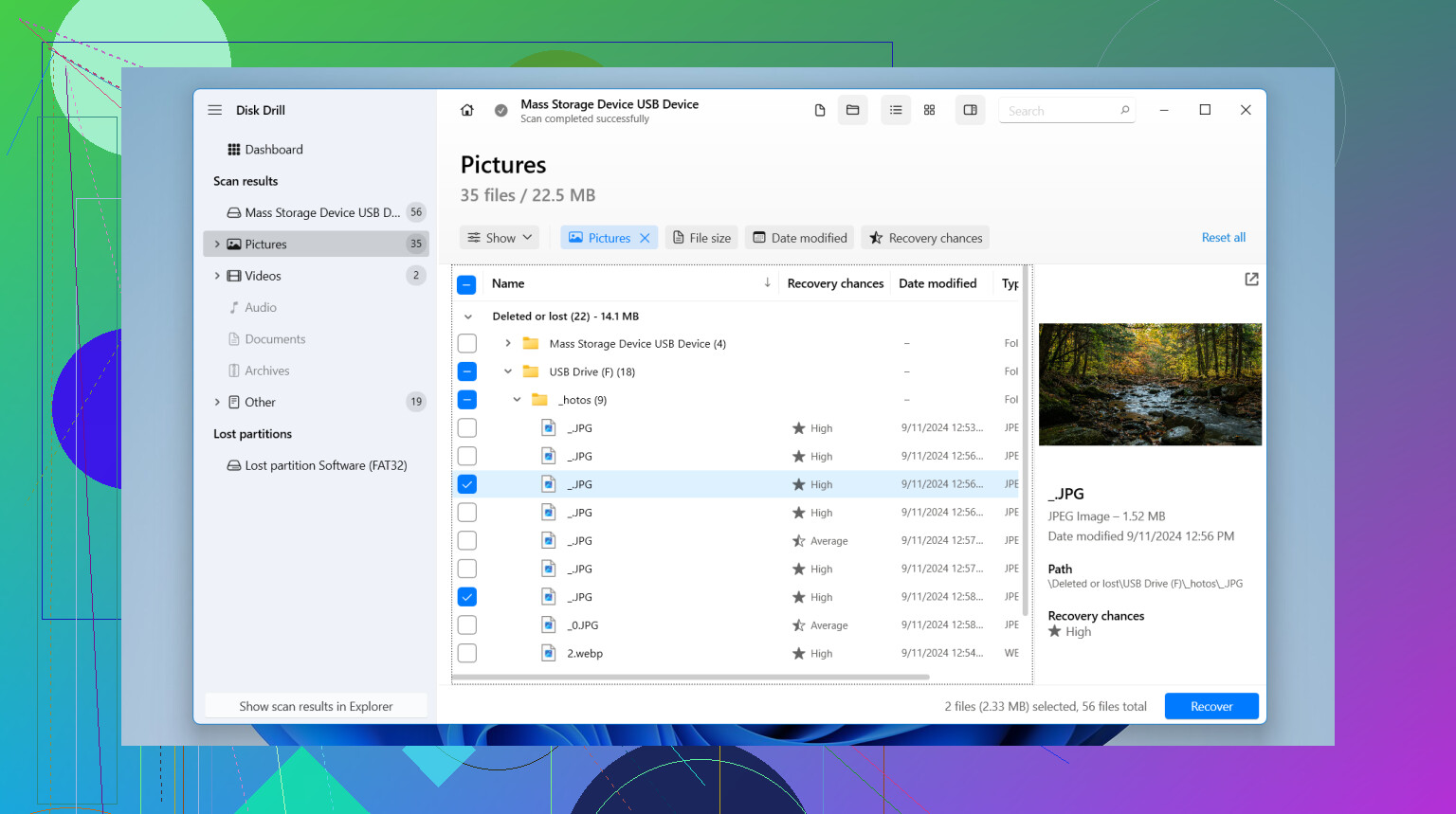
If you don’t have a backup, I’d move straight to recovery software. My first pick here is Disk Drill. I used it on camera media because the workflow is easy to follow, it reads common card formats like FAT32 and exFAT, and it does a decent job with RAW files and big video clips. Preview matters more than people think. I don’t want to restore 400 files with names like file0001 and then find out half are broken.
What I’d do, step by step:
- Pull the CF card and leave it out of the camera. Recovery first, experiments later.
- Connect it with a card reader. A direct reader tends to be cleaner than using the camera as the middleman.
- Open Disk Drill and pick the CF card itself. Double check this. You don’t want to scan the wrong drive.
- If the card is unstable, make an image first. A byte-to-byte backup gives you a safer copy to scan.
- Run a full scan. Let it finish. Cutting it short can miss older or damaged entries.
- Preview the results. I open a few photos and clips before restoring anything. It saves time.
- Recover to another drive. Your computer’s internal storage or an external drive is fine. Do not write the recovered files back to the CF card.
If you want other options, PhotoRec is worth keeping in mind. It’s free, and I’ve seen it pull files from cards with trashed file systems. Downside, the output gets messy fast, and filenames are often gone. UFS Explorer is solid too, though I’d only point people there if they’re okay with more technical tools and more knobs to turn. For a plain CF card recovery job, I’d still start with Disk Drill since it’s less of a headache.
And yeah, one more thing. If Windows or macOS pops up with a format prompt, don’t hit it. That message only tells you the system failed to read the card cleanly. It does not mean formatting is the safe next step. Recover first. Back up your files. Format later, if you still want to keep using the card.
1 Like
Used space with missing NEFs usually points to broken directory entries, not erased image data. So I agree with @mikeappsreviewer on one thing, don’t let the camera write to the card again. Where I differ is this, before scanning the card directly, I’d make a full image of it if the reader sees it cleanly. CF cards sometimes drop offline mid-scan, and then you get a worse mess.
What I’d do:
- Put the CF card in a dedicated reader.
- If your system sees the full size, clone or image the card first.
- Scan the image, not the original card.
- Look for NEF by file signature, not only by filename.
- Save recovered files to your computer or another drive.
For Nikon RAW, Disk Drill is a solid pick because it finds lost partitions, deleted entries, and carved RAW files in one pass. If the file system is toast, PhotoRec often pulls NEFs too, but filenames and folder structure get wrecked. That part is annoyng.
Also check Nikon NX Studio or another RAW browser after recovery. Some recovered NEFs open fine there even when Windows preview says they’re broken.
If the missing shots were taken in one burst or near one time block, compare file numbers before and after the gap. That tells you whether the files were deleted, or if the card stopped updating the index during shooting.
If you want a visual walkthrough, this step by step video for recovering files from a memory card is easier to follow than most forum posts.

Used space + missing NEFs is often a metadata problem, but I’d add one thing neither @mikeappsreviewer nor @chasseurdetoiles really stressed enough: check whether the files are just invisible to the OS but still readable by Nikon software.
If the card mounts, try browsing it with NX Studio, FastRawViewer, or even exiftool from terminal before you do anything fancy. I’ve seen NEF files that didn’t show properly in Finder/Explorer but were still there with weird directory damage. Not common, but it happens.
Also, if this was a Nikon writing to FAT32, look for split behavior or abnormal file numbering. If the “missing” photos all sit around one sequence gap, that can point to a corrupted folder entry rather than true deletion. Different problem, same panic.
I do agree on one point: don’t “repair” the card first. chkdsk/fsck is where people turn recoverable into actualy gone.
My order would be:
- Write-protect mentally, meaning no more camera use.
- Read the card in a quality CF reader.
- Check SMART-like behavior if your reader exposes errors, or at least see whether reads are stalling.
- If stable, make an image.
- Try file-system level browsing of the image.
- Then do signature recovery for NEF.
Disk Drill makes sense here because it can do both normal recovery and RAW carving without a giant learning curve. If it finds Nikon .NEF files with previews, that’s usually a decent sign. If not, PhotoRec is the “ugly but effective” backup option.
One more practical bit: recover to another drive, then open the NEFs in Nikon software, not just Windows Photos. Windows says “corrupt” to files that Nikon apps will open just fine. Super annyoing.
Also, for anyone looking for a simple guide on recovering deleted videos from an SD card step by step, that walkthrough is easier to follow than most forum advice.
Used space with missing NEFs can also mean the card’s allocation table is partly intact but the camera stopped finalizing some writes. So I’d check one thing the others only hinted at: whether the “missing” shots are actually fragments from an interrupted write, not whole deleted files.
Quick test: after imaging the card, inspect recovered NEFs by size. Nikon RAWs from the same shoot should be in a pretty tight size range unless ISO/content changed a lot. If the missing ones recover as tiny files, or all break at the same size point, that suggests write interruption or card/controller trouble, not simple directory loss. In that case, don’t trust the card again even if recovery works.
I agree with @chasseurdetoiles, @stellacadente, and @mikeappsreviewer about avoiding repair tools and saving output elsewhere. Where I slightly disagree is jumping straight into broad recovery without checking pattern clues first. File numbering gaps, abnormal NEF sizes, and whether the losses cluster in one burst can tell you a lot before you spend hours scanning.
As for software, Disk Drill is a reasonable middle ground here.
Pros:
- easy to scan card images
- finds both filesystem entries and carved NEFs
- preview is useful for checking if files are actually usable
Cons:
- carved results may lose original names/folders
- deep scans can take a while
- if the NEF data itself was only partially written, no app can fully rebuild it
If Disk Drill doesn’t produce good NEFs, then you’re likely dealing with incomplete data rather than hidden files. That’s the point where card retirement is the real fix, not more recovery passes.