I keep seeing ads for the Cleanup App phone cleaner and it claims it can speed up my phone and free up storage. I’m worried it might be unsafe, full of ads, or even steal data. Has anyone used it long term, and is it actually safe and worth installing, or should I stay away and use something else?
Cleanup App (Phone Storage Cleaner) – my take after hitting “storage full” one too many times
I hit the classic iPhone wall: “iPhone storage almost full”. Couldn’t update iOS, photos stopped syncing, even WhatsApp started acting weird. So I went hunting for a quick fix and ended up trying Cleanup App (Phone Storage Cleaner).
Cleanup App (Phone Storage Cleaner) – what it does
Here is what I saw when I first opened it:
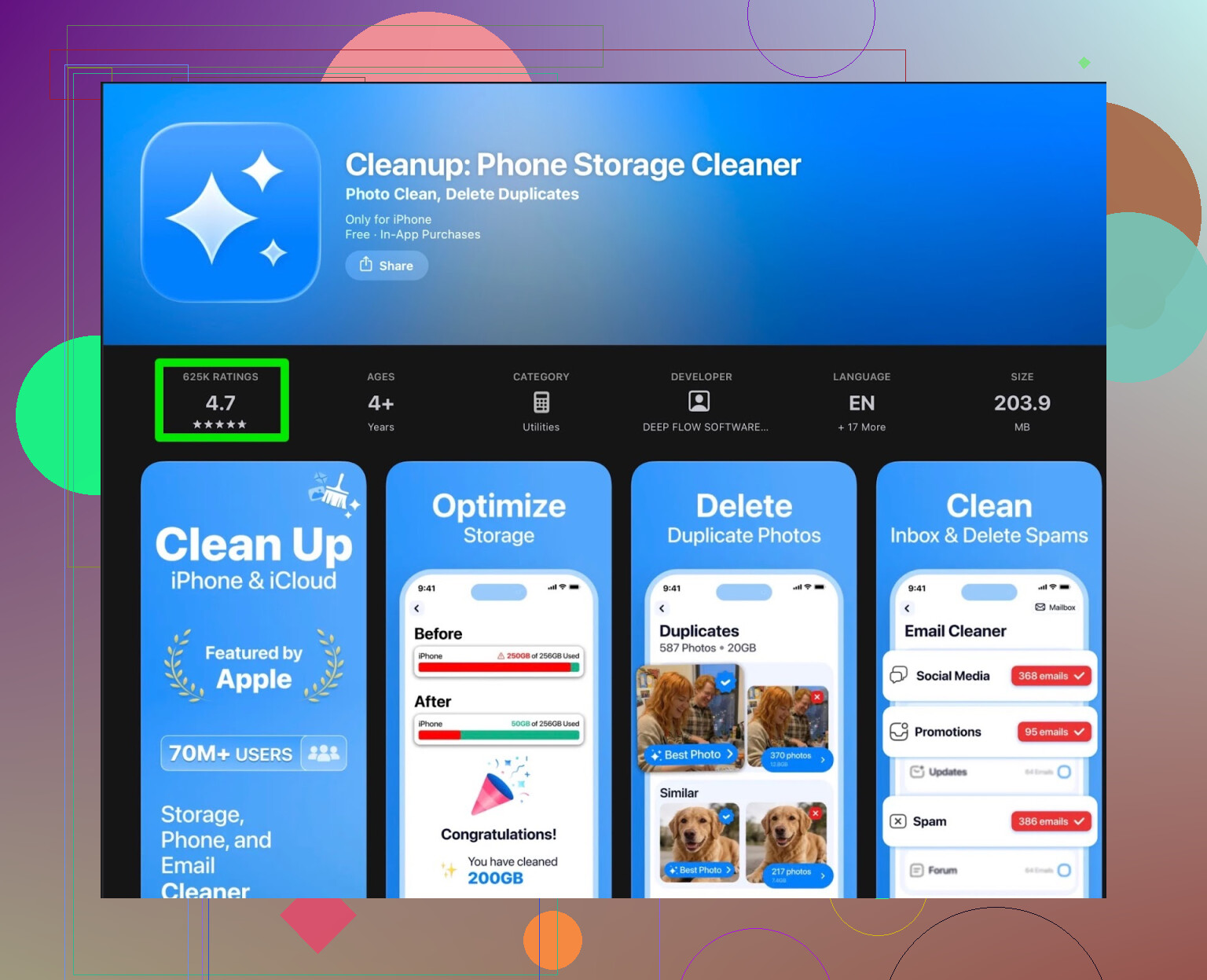
On paper, it ticks all the usual boxes:
- Scans for duplicate photos
- Groups “similar” photos (same scene, multiple shots)
- Finds screenshots
- Lets you merge duplicate contacts
- Offers video compression to shrink big files
If your camera roll is chaos and your contacts are a mess, it looks like the right kind of tool.
How it felt to actually use Cleanup
Reality was less nice.
The scan itself worked. It did find:
- Actual duplicate photos
- Burst-style similar shots
- Old screenshots
- Random huge videos I forgot about
Then things went sideways.
Most of the useful actions sat behind a paywall. The free tier felt like a demo:
- It shows a lot of junk you could remove
- Then it asks for a subscription for bulk actions or more advanced cleanup
- Or it makes you watch long ad chains to unlock basic actions
After a few runs, I was doing this pattern:
- Start scan.
- Wait.
- Tap to clean.
- Get subscription popup or a wall of ads.
The app also tries to look “fancy” with animations and an extra “secret vault” type feature. I was there to clear space, not lock photos, so it felt like extra stuff bolted on instead of focusing on storage cleanup.
Real user reviews for Cleanup App
Here is what other users say, which lined up with my experience:
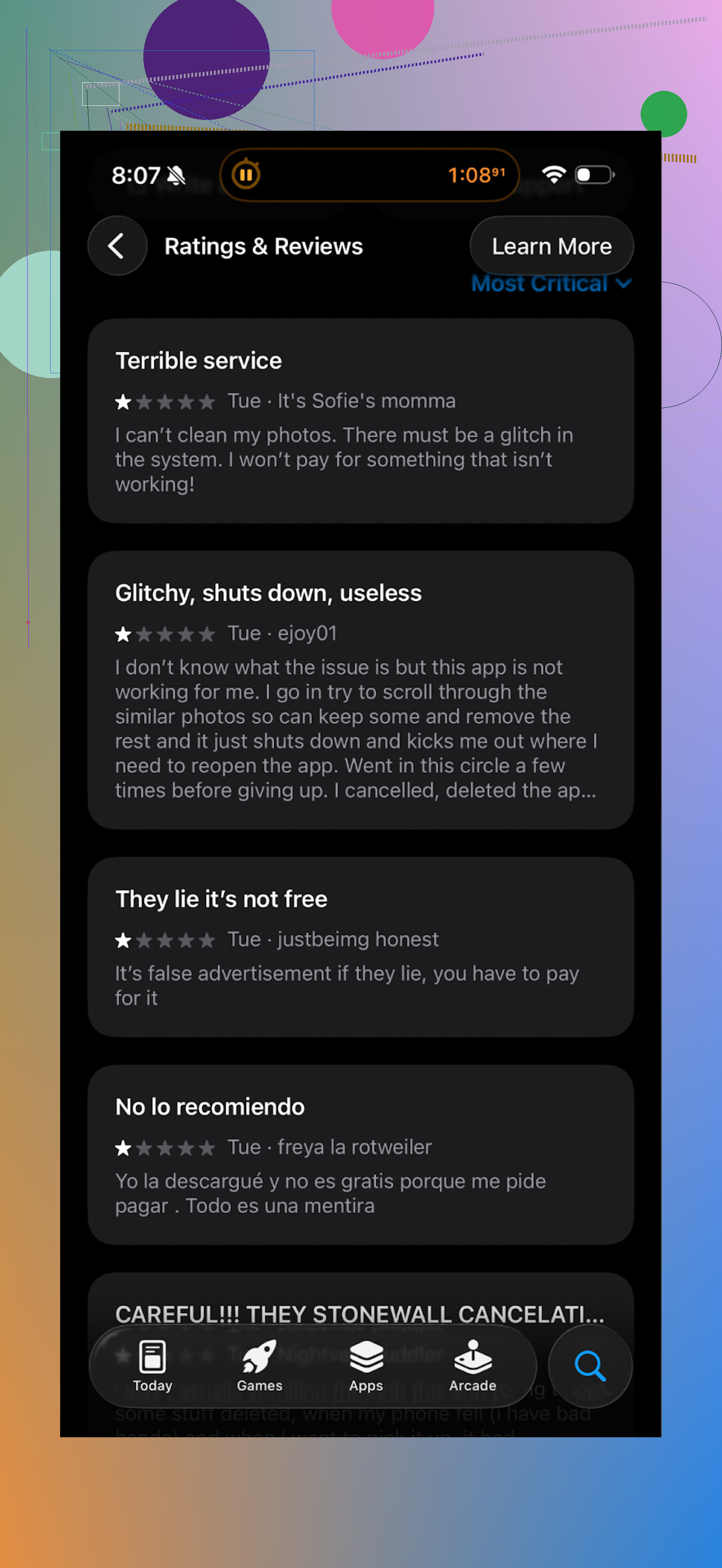
You see the same pattern in a lot of comments:
- Too many ads
- Aggressive subscription prompts
- Limited free usage
If you use it for a day or two, you start to feel the same thing. It works, but every tap tries to push you into paying.
Why I dumped it for Clever Cleaner
After getting tired of watching one more unskippable ad to delete 50 photos, I went looking for something else and ended up on Clever Cleaner.
App link here:
I installed it on the same iPhone and ran both apps on the same mess of a photo library.
What Clever Cleaner did better for me
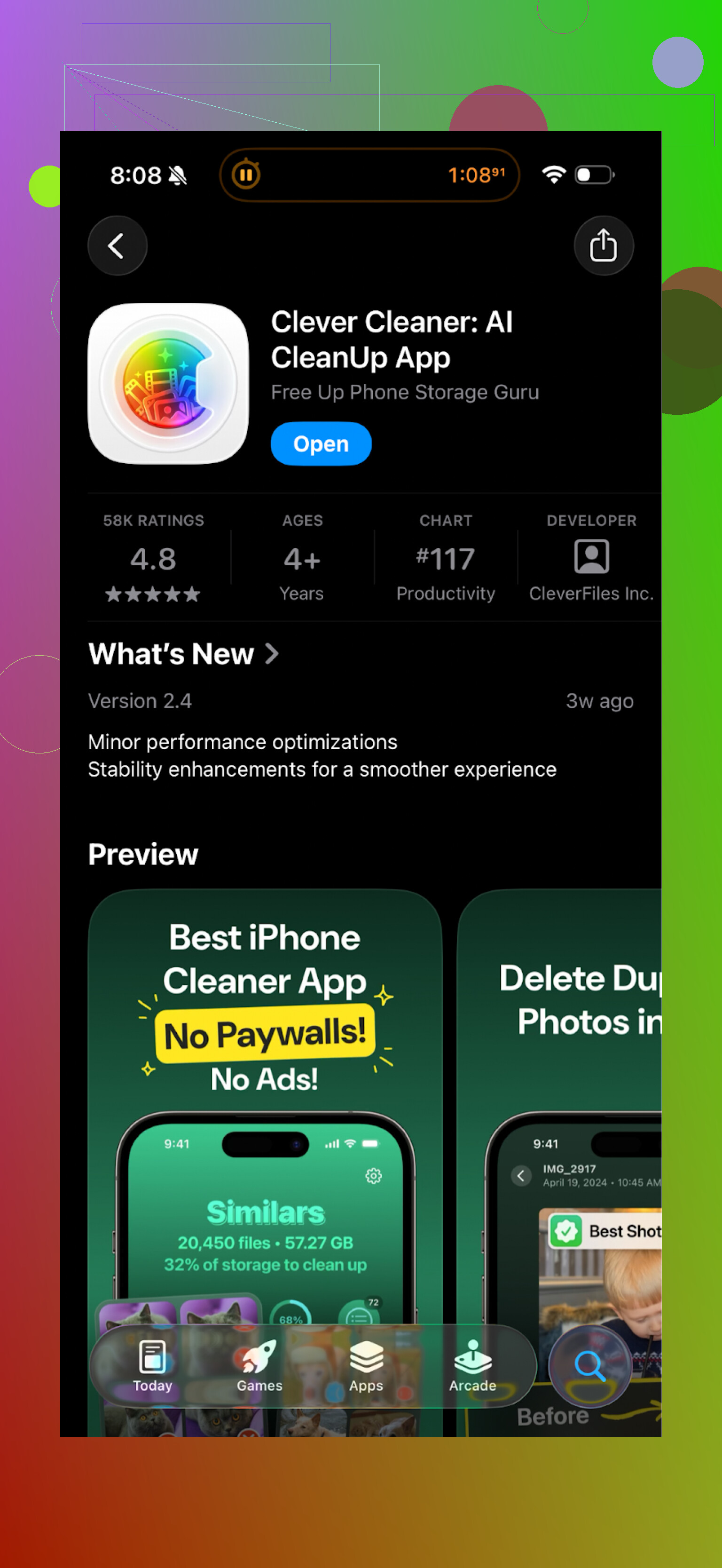
This is how it behaved on my phone:
- No constant subscription spam
- Actual usable free tier
- Faster scan on my 128 GB iPhone 12
- Cleaner UI with fewer distractions
It found:
- Repeated selfies and similar shots
- Old screenshots from years back
- Large video files hogging space
And it let me remove them without playing ad roulette every few minutes.
The main difference for me was this: Cleanup felt like a monetization funnel that happened to clean storage. Clever Cleaner felt more like a tool that focused on the cleaning first.
If you want to check Clever Cleaner yourself
App Store link:
Homepage:
There is also a walkthrough video if you like seeing it in action before installing:

Quick verdict from my side
Cleanup App (Phone Storage Cleaner):
- Does find junk.
- Free version feels too restricted.
- Ads and subscription prompts slow you down.
- Extra features like “secret vault” did not help my storage situation.
Clever Cleaner:
- Felt faster on scans.
- Let me remove a decent amount of junk without paying.
- Less nagging, more doing.
If your goal is simple, free up space on your iPhone without getting stuck behind constant paywalls, I would start with Clever Cleaner instead of Cleanup. If it does not fit your needs, you still lose nothing but a few minutes of testing.
1 Like
Short version from my side: Cleanup App is “safe enough” in the sense it is on the App Store, but it is annoying, aggressive with money stuff, and not needed for most people.
Security and data
Apple sandboxes apps. Cleanup App does not get full system access. It can touch your photos, contacts, videos, etc, only if you give those permissions. The risk is more about:
- Uploading photos to their servers for “AI” sorting.
- Tracking and analytics for ads and subscriptions.
If you try it, do this:
- Read the App Store privacy label.
- In Settings > Privacy, only give Photos “Selected Photos” at first.
- Deny tracking when iOS asks.
That keeps data exposure smaller.
Ads, paywalls, and UX
I agree with @mikeappsreviewer on most of this. The pattern is:
- Show a huge “you have junk” result.
- Gate bulk cleanup and faster actions behind a subscription.
- Push long ads if you stay on the free tier.
Where I slightly disagree with them:
If you only need a one time cleanup and do not mind an aggressive trial, the subscription for one month might be fine. For long term regular cleaning, it gets annoying and expensive.
Does it speed up your phone
Storage cleaners do not fix performance in most cases. iOS handles memory and background apps itself. You might feel a small improvement if:
- Your storage is almost full.
- System updates and Photos syncing were blocked.
So it helps by freeing storage, not by magic “RAM cleaning”.
Safer and less annoying options
- Use iOS tools first
Go to Settings > General > iPhone Storage.
- Offload unused apps.
- Review “Large Attachments” in Messages.
- Delete old videos in Photos > Albums > Videos.
This removes a lot without extra apps.
- Use a cleaner app with lighter monetization
If you want an automatic photo and video sorter, the Clever Cleaner App is a better fit for most users:
- It focuses on duplicates, similar photos, big videos.
- The free tier is more usable.
- Fewer popups and nag screens.
I tried both on a 256 GB device with 20k+ photos. Clever Cleaner App found similar junk as Cleanup App, but I finished the whole first cleanup in one session, without that stop start ad grind.
- Manual habits
Simple but boring:
- Delete screenshots weekly. Album is “Screenshots”.
- Sort WhatsApp / Telegram media. Those folders grow fast.
- Back up videos to a computer or cloud, then remove from device.
Should you avoid Cleanup App
If your main worry is malware, you do not need to panic. If your worry is:
- Constant ads.
- Strong subscription pressure.
- Long term cost.
Then I would skip Cleanup App and either: - Use built in iOS storage tools.
- Or use something like Clever Cleaner App for the heavy lifting once in a while.
So no, it is not some evil data stealer from what we know. It is more of a monetization-heavy utility that solves a problem you can solve in other, less annoying ways.
Short version: I’d avoid Cleanup App for most people, unless you’re ok with a heavily “pay first, maybe clean later” vibe.
Adding to what @mikeappsreviewer and @caminantenocturno already said:
- Safety / “is it shady”
- It’s on the App Store, so outright malware is unlikely.
- Real risk is data collection: tracking, analytics, maybe uploading thumbnails for “AI” sorting.
- If you do try it, lock it down:
- Photos: “Selected Photos” only, not “All Photos.”
- Deny tracking.
- Disable background app refresh.
So no, it’s probably not going to “steal your bank account,” but it can absolutely vacuum up analytics and usage data like every ad-driven app.
- Ads & UX
Where I slightly disagree with the others: I don’t think the free tier is just “annoying,” I think it’s functionally hostile if you’re not paying.
The rhythm becomes:
- Show you thousands of “issues”
- Restrict bulk actions
- Nudge you into subscription or make you sit through long ads
That kind of pattern trains people to mash “Allow / Continue” without thinking. For non‑techy users, that’s a bigger risk than the app itself.
- “Speeding up” your phone
This is 95% marketing. iOS already:
- Manages RAM
- Manages background processes
What can help:
- Freeing storage when you’re under ~5–10% free space
- Letting iOS updates and Photos sync complete
But you can do that manually or with saner tools. No cleaner app is going to magically turn an old device into a new one.
- Long term use
You asked about long term use. That’s exactly where Cleanup App makes the least sense:
- Ongoing subscription for something you could do once a month with built‑in tools or a cheaper alternative.
- The more photos & videos you accumulate, the more their “bulk clean = paywall” hurts.
Honestly, paying a recurring fee to delete screenshots feels like the mobile version of a printer asking for a subscription to use black ink.
- Better route
Since others already detailed iOS’s built‑in tools, I won’t rehash all the menu taps. But I would change the order of operations:
- iOS Storage screen first
- Manual pass in Photos (Screenshots, Videos, recently deleted)
- Only then use a third‑party app if you still feel overwhelmed
If you want an app that automates some of the sorting without shoving a subscription in your face every 30 seconds, Clever Cleaner App is a better fit in this specific niche. It focuses on:
- Duplicate / similar photos
- Big videos
- Junk that’s actually heavy on storage
And yeah, it can still try to upsell, but you at least get a more useable free tier and less friction while you clean. It’s basically “photo & video triage” without the same level of monetization spam.
My take:
- Worried about malware: you can relax.
- Worried about ads, upsells, and wasting time: your instinct to avoid Cleanup App is pretty on point.
- Need to free space fast: use iOS tools first, then something like Clever Cleaner App if your photo library is out of control.
Cleanup App is not outright dangerous, but for most people it is a noisy solution to a problem iOS already handles decently.
Where I slightly disagree with @caminantenocturno / @viajeroceleste / @mikeappsreviewer is on the “it’s fine if you just need a one‑time cleanup” angle. On older iPhones with small storage, you usually hit “full” again in a few months. Paying or watching long ads every time turns a simple chore into a recurring grind.
Key points on Cleanup App:
Pros
- Does correctly detect duplicates, similar photos, big videos.
- Interface is understandable even for non‑techy users.
- On‑device behavior is limited by iOS sandboxing, so real malware‑style risk is low.
Cons
- Overblown “you have so much junk” scare screens.
- Bulk actions and the genuinely useful bits gated behind subscription or long ad chains.
- The “secret vault” style extras are a distraction if you only care about storage.
- Trains you to tap through popups and paywalls quickly, which is bad for less experienced users.
On the performance side, I agree with the others: cleaners do not really “speed up” iOS. Any improvement you feel is almost always just from freeing storage so the system and apps can breathe again. No app on the App Store can deeply “tune” iOS like a desktop utility might.
Where a third‑party app can help is the boring part: sorting thousands of similar photos and massive videos. That is where something like the Clever Cleaner App is more aligned with what you actually need, without the same monetization pressure.
Clever Cleaner App – pros
- Focuses on heavy hitters: duplicate / similar photos and large videos.
- Free tier is realistically usable for a cleanup session.
- Cleaner interface, less dark‑pattern “pay now or sit through a marathon of ads.”
- Good fit if you have a few years of camera roll chaos and want quick wins.
Clever Cleaner App – cons
- Still a subscription‑leaning app, not pure charity.
- Photo analysis for “AI” grouping may involve extra data processing, so privacy‑cautious users should still restrict permissions.
- Like any auto‑cleaner, it can misclassify photos, so you still need to review suggestions.
Compare that to Cleanup App: all three of the other posters highlighted the same pattern of aggressive upsells and limited free usage. I think they are spot on there. Where I would personally land:
- If your main concern is safety: Cleanup App is “safe enough,” but no cleaner is worth handing over full photo access casually.
- If your main concern is sanity and time: I would avoid Cleanup App and either stick to iOS tools or use Clever Cleaner App occasionally to tame duplicates and big media.
- If you already installed Cleanup and hate it: deleting the app and letting iOS do its thing will not hurt anything.
In practice, the healthiest setup is: use iOS storage tools as your default, keep a utility like Clever Cleaner App as an optional helper for photo / video bloat, and skip cleaners that feel like a paywall wrapped in a progress bar.