I’ve been using Walter Writes AI to humanize AI-generated content, but I’ve hit the limits of the free version and can’t afford a paid plan right now. I’m trying to keep my writing sounding natural for blogs and social media while still using AI tools to save time. Can anyone recommend a truly free or low-cost AI humanizer that works as well as Walter Writes AI, or share how you handle this without expensive tools?
- Clever AI Humanizer, my take, numbers included
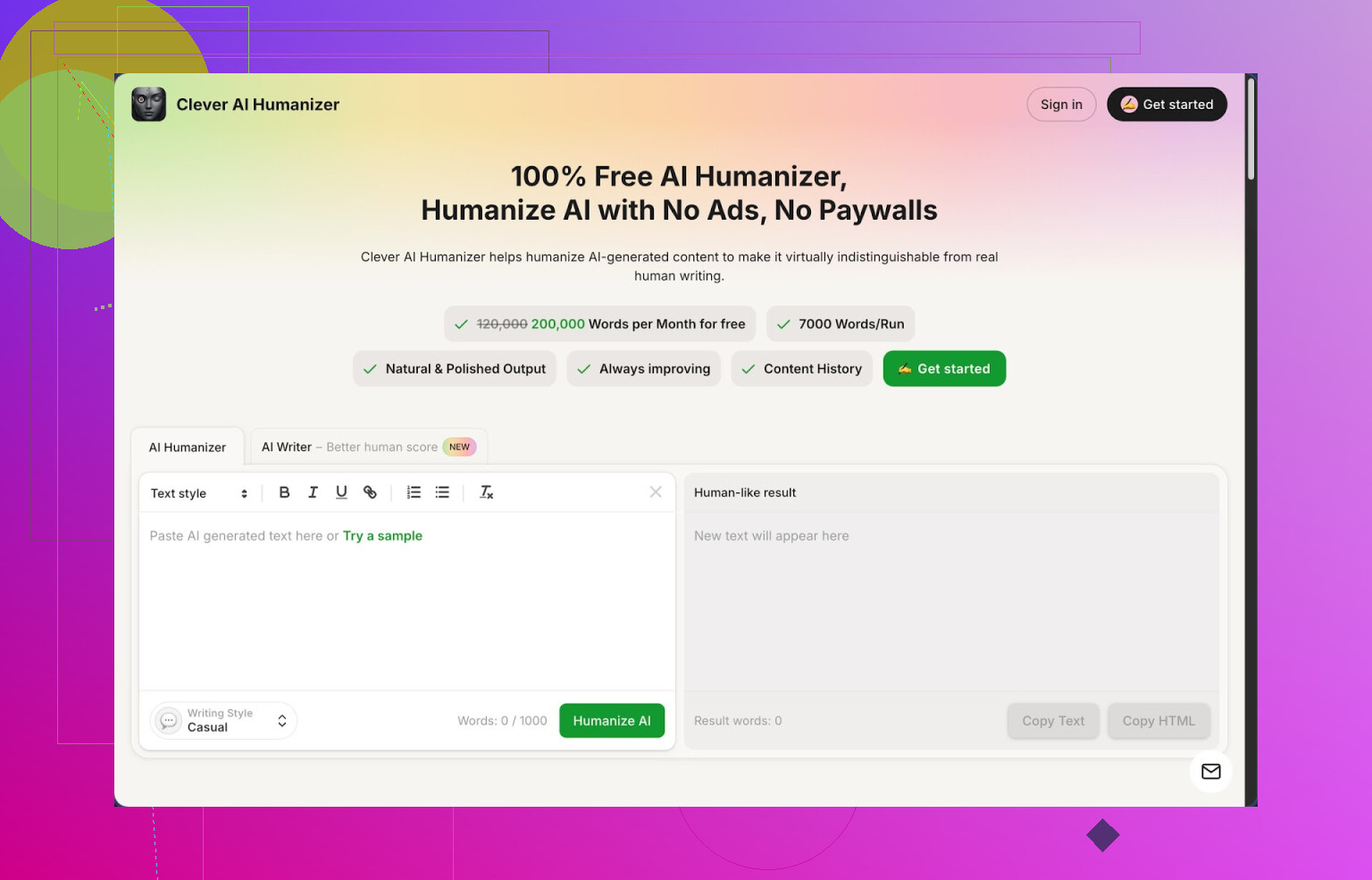
Link: https://cleverhumanizer.ai
I tripped over Clever AI Humanizer while trying to get past some of the stricter detectors without wrecking my original drafts. I went in expecting another “rewrite and pray” tool and ended up using it more than I thought I would.
Here is what I saw after a full day of messing with it.
What you get for free
No signup paywall in my case and no credit countdown anxiety.
Approx limits I hit:
- 200,000 words per month
- Up to around 7,000 words in a single run
Three preset styles:
- Casual
- Simple Academic
- Simple Formal
Plus three extra modules in the same interface:
- AI Writer
- Grammar Checker
- Paraphraser
The main thing, the Humanizer module
Workflow I used:
- Took raw text from GPT, Claude, and another model. Around 1,500 to 5,000 words per test.
- Dropped it into Clever AI Humanizer.
- Picked “Casual” most of the time, “Simple Academic” for a few tests.
- Hit run and waited a few seconds.
The tool spits out a rewritten version that feels more like a slightly rushed human draft. It does not mutilate the structure as much as some paraphrasers I tested earlier this year.
Big plus for me, the meaning stayed almost identical in most samples. It changes phrasing, sentence rhythm, and a bit of word choice, but the claims and facts survived.
AI detection results
I tested three different pieces of content generated with a mainstream LLM, then humanized them using the “Casual” style.
Detector used:
- ZeroGPT
Outcome for those three:
- All three came back as 0 percent AI on ZeroGPT after humanization.
Important detail, other detectors do not always agree. I tried some external ones and got mixed results. So treat the “0 percent” more as “passes ZeroGPT in my tests,” not as universal invisibility.
Where it helped me most
Use cases that worked:
-
Long blog-style drafts
I dumped a 4,800 word article into it. It handled the full block without me having to slice it into chunks. That alone saved time compared with tools that cap at 1,000 words per run. -
Emails and reports that sounded robotic
Shorter stuff like outreach templates or internal docs started to sound less stiff. I still went through and edited the output, but the starting point felt closer to what I would write on a tired afternoon. -
Iteration loops
Since the monthly limit is high, I did a few passes:
- First pass, full article from GPT.
- Second pass, humanize in Casual.
- Third pass, tweak a few sections manually.
No fear of burning through credits.
Integrated AI Writer
There is a built in writer that lets you generate content and humanize it within the same flow.
What I did:
- Entered a topic and a short description.
- Generated a rough article.
- Immediately sent it through the Humanizer.
The resulting text scored better on human detection in my tests compared with exporting from a normal chatbot and running that directly through detectors. Hard to prove with one set of tests, but the pattern repeated a few times.
So if you do not already have a favorite AI writer, using theirs plus their humanizer in one place keeps your workflow simple.
Grammar Checker
The Grammar Checker is basic but useful.
It:
- Fixed spelling.
- Cleaned up punctuation.
- Removed some clunky phrases.
I used it after the Humanizer pass on a couple of pieces that needed to look clean for clients. It did not rewrite tone, it stayed closer to Grammarly style corrections, which worked fine for “make this publishable” tasks.
Paraphraser
The paraphraser behaves differently from the Humanizer.
- Humanizer focuses on “make this look like a human wrote it.”
- Paraphraser focuses on “say the same thing in different words.”
I used the paraphraser for:
- Adjusting text for SEO experiments.
- Changing tone slightly for different platforms.
- Rephrasing sections of older drafts so they did not sound copy pasted.
It preserved meaning decently in my tests. I still double checked factual parts, but nothing broke in obvious ways.
How the four tools fit together
Everything is in one interface:
- Generate: AI Writer
- Humanize: AI Humanizer
- Clean: Grammar Checker
- Rephrase: Paraphraser
My rough pipeline for a test article:
- Topic in AI Writer.
- Run the result through Humanizer, Casual mode.
- Use Paraphraser for any sections that still felt mechanical.
- Final pass with Grammar Checker.
- Manual edit in my usual editor.
Took less time than juggling three different websites.
Where it falls short
Not magic. A few issues I hit:
- Some detectors still flagged AI
On tools other than ZeroGPT, I got:
- Low AI probability on a few runs.
- Medium AI probability on some.
So if you are trying to “beat every detector on earth,” you will be disappointed.
-
Output sometimes gets longer
After humanization, text length went up by roughly 10 to 30 percent in several samples.
Reason seems simple, it often breaks compact AI sentences into expanded explanations. Good for hiding patterns, not great if you need strict word counts. -
Occasional “over smoothing”
A few paragraphs felt too generic after humanization. I had to re-inject specifics or my own phrasing. So I treat it as a starting point, not a final draft.
Who it fits
From my use:
- Students who want AI-assisted drafts but need them to sound closer to their own voice, with some manual edits.
- Content writers stuck with stiff AI outputs and no budget for paid tools.
- People testing AI detectors and needing something free to experiment with.
If you already use a paid stack with high-end rewrite tools, this might feel less special. If you are on a budget and fight detectors regularly, it is worth a look.
More detailed review and resources
Full detailed Clever AI Humanizer review with screenshots and detector proof is here:
YouTube review here:

Reddit thread on best AI humanizers:
https://www.reddit.com/r/DataRecoveryHelp/comments/1oqwdib/best_ai_humanizer/
General Reddit thread about humanizing AI text:
https://www.reddit.com/r/DataRecoveryHelp/comments/1l7aj60/humanize_ai/
1 Like
You are hitting the same wall a lot of people hit with Walter Writes, so you are not crazy.
Since @mikeappsreviewer already went deep on Clever Ai Humanizer, I will not repeat the whole workflow. I will add some angles and a few alternatives so you are not locked into one tool.
- Clever Ai Humanizer as a Walter replacement
If you want something closest to “paste, humanize, done” for blogs and socials, Clever Ai Humanizer is probably your best free bet right now.
Key points for your use case:
- Handles long posts in one go, so you do not have to chop articles.
- Styles like Casual and Simple Academic fit blog content and LinkedIn style posts.
- No hard daily paywall, so you can batch a week of posts in one session.
I disagree a bit with the idea you should always rely on detectors as the main measure. For blog and social content, what matters more is:
- Does it sound like you.
- Does it keep facts intact.
- Does it read fast on mobile.
Use detectors as a sanity check, not the main goal.
- Simple free workflow without paid tools
If money is tight, try this stack for each blog or social post:
Step 1: Generate or draft
- Use your usual model for the main idea.
- Keep it short, 600 to 1,000 words for blog, 80 to 200 for social.
Step 2: Run through Clever Ai Humanizer
- Pick Casual for blogs and socials.
- If it starts sounding too bland, re-run only specific paragraphs instead of the whole text.
Step 3: Manual “speed human edit”
This is where many people skip, and the text stays robotic. Spend 5 to 10 minutes to:
- Add 1 or 2 short personal lines per post. For example “When I tried this last month…” or “I messed this up earlier…”
- Swap a few words to your real voice. If you never say “moreover”, kill it.
- Shorten long sentences. Split them in two.
- Extra free tricks to humanize without any tool
If Clever is down or you run into limits, here is a quick manual pattern that works better than people expect:
- Read one paragraph out loud.
- Anywhere you trip, rewrite the sentence shorter.
- Add one “why this matters” line after each section.
- Add one tiny story or example every 300 to 400 words.
Example, AI version:
“Email marketing is an effective channel for reaching potential customers.”
Human quick fix:
“Email still works. Last month I sent one short email and got three replies in under an hour.”
You can do this pass in 10 minutes on a 1,000 word blog post.
- Avoid getting flagged for silly reasons
For blogs and socials, a lot of “AI-feel” comes from patterns, not the tool:
Try to avoid:
- Repeating the same structure: “First, second, third” in every post.
- Overuse of words like “leverage”, “robust”, “comprehensive”.
- Long intro that explains “in this article we will explore…”.
Try to add:
- One quick opinion per section. For example “I think this is a waste of time” or “This saved me hours.”
- One specific detail. For example “I tried this on a Tuesday morning with 200 subscribers.”
- When to stop editing
If you write for your own blog and socials, do not chase 0 percent AI score everywhere. That is endless.
Reasonable bar:
- Text sounds like how you talk when you are a bit tired.
- You disagree with at least one sentence and edit it. That means your voice is in there.
- You have one small story or example in the piece.
That level is enough for most readers and platforms.
If you want to keep it simple, do this for every post:
- Generate.
- Run once through Clever Ai Humanizer.
- Spend 5 to 10 minutes doing a loud read and quick edits.
That will put you ahead of a lot of raw AI content without needing a paid plan.
You’re not stuck with Walter, but you are stuck doing a bit more work yourself than the “one-click and pray” flow.
Couple of thoughts that add to what @mikeappsreviewer and @techchizkid already covered:
- Clever Ai Humanizer as the core tool
They already showed it’s solid. I’ll add: it’s currently one of the few free tools that doesn’t feel like a trap to immediately upsell you for every 300 words.
Where I use it differently:
- I don’t always humanize the full article. I paste in only the stiffest sections (intros, conclusions, list sections that sound like a textbook).
- For social posts, I often just run 2–3 lines at a time so the tone shifts less. Whole-post humanization can sometimes sand off too much personality.
- Don’t outsource your “voice” to a humanizer
This is where I disagree a bit with the idea of just making a pipeline and trusting the tool. If all your posts get run through Clever Ai Humanizer (or Walter, or anything), they start to share the same “house style.”
So:
- Use the tool to break the obvious AI patterns.
- Then intentionally add 3–5 “you” markers:
- A word you overuse in real life (“kinda”, “honestly”, “to be fair”).
- A small rant or mini hot take.
- One oddly specific detail: “I wrote this at 1:17 am with cold coffee.”
- Rotate your process depending on platform
Walter is very “blog first.” For free alternatives:
- Blogs:
- Generate with your main model.
- Humanize only the intro, transitions, and conclusion using Clever Ai Humanizer in Casual or Simple Academic.
- Leave some body paragraphs mostly intact and edit them manually.
- Twitter / Threads:
- Honestly, skip tools most of the time. Short form is easier to fix by hand.
- If you must, humanize batches of 3–4 tweets, not the whole thread.
- LinkedIn:
- Use Clever Ai Humanizer to break the corporate tone, then re-add 1–2 “corporate-ish” lines so it still feels native to the platform.
- A quick manual anti-detector pattern
When you’re out of all tool limits:
- Cut intros to 1–2 sentences.
- Replace any “in this article, we will explore” type line with a blunt opener: “Here’s what actually worked when I tried X.”
- Turn generic advice into a timeline: “Day 1 I did X… by day 3 I realized Y was useless.”
That tiny narrative structure is something most raw AI still screws up, and you don’t need any paid plan for it.
- Don’t chase “100% human” scores for blogs/socials
Detectors are a mess and disagree with each other anyway. For your use case (blog + socials, not academic papers):
Use this simpler check instead:
- Does at least one line sound slightly uncomfortable for you to publish?
- If yes, your real voice is probably in there.
- Did you delete at least one paragraph the AI wrote because you thought “this is bs”?
- Good. That means you’re not just rubber-stamping outputs.
So yeah:
- Replace Walter with Clever Ai Humanizer as the main free tool.
- Stop throwing whole articles blindly into humanizers. Target the robotic parts.
- Always do a 5–10 min pass where you add your quirks back in.
That combo keeps it free, keeps you under most detection radars, and more importantly keeps your stuff from reading like the same Medium post everyone else is posting.