I’m looking for a free competitor or alternative to Originality AI’s Humanizer tool that can help make AI-generated content sound more natural and pass common AI detection checks. I’ve tried a few tools, but they either cost too much or don’t really improve the text. Can anyone recommend reliable, truly free options or workflows that actually work for humanizing AI content while keeping it accurate and readable?
- Clever AI Humanizer review, from someone who pushed it a bit too hard
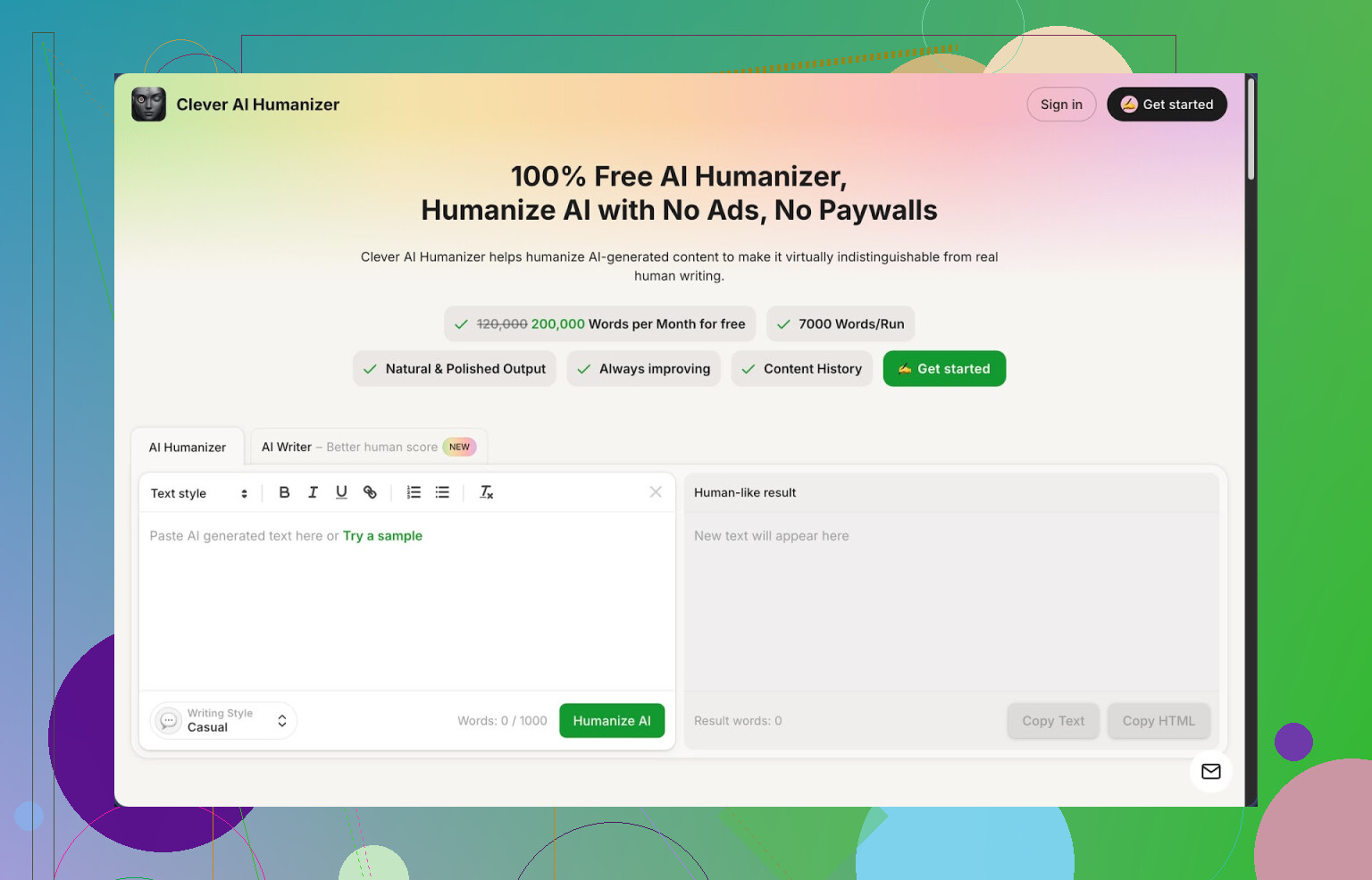
Link: https://cleverhumanizer.ai
I spent a weekend trying different “AI humanizer” tools because I was tired of pasting stuff into detectors and seeing 100% AI highlighted in red. Out of everything I tried, Clever AI Humanizer ended up being the one I kept open in a pinned tab.
Here is why I stuck with it.
What you get for free
The thing that surprised me first was the free quota. You get:
• Around 200,000 words per month
• Up to about 7,000 words per run
• Three styles: Casual, Simple Academic, Simple Formal
• A built in AI writer
No account with a tiny limit, no aggressive paywall while you test it. I ran long essays, email sequences, and some client blog drafts through it without hitting a hard stop.
How the “humanizer” part behaves
Here is what I did.
I pulled a long ChatGPT essay, pasted it into the “Free AI Humanizer” module, picked Casual, and hit the button. A few seconds later I got something that sounded less stiff and more like someone who has written a few emails in their life.
I then pasted the output into ZeroGPT. For three different test pieces in the Casual mode, ZeroGPT showed 0% AI. I am not saying this will always happen for you, but on my side, the scores were clean on those runs.
The stronger points I noticed:
• It accepts long inputs, so you do not have to cut text into small chunks.
• It stays close to the original meaning most of the time, instead of turning one paragraph into some weird rant.
• The sentences got a bit more varied, which helped with that “robot rhythm” most AI outputs have.
You paste text, pick style, click, skim through, and tweak. Simple, no fluff UI.
Other tools inside the same site
I tried the other modules too, since they sit in the same interface.
- Free AI Writer
You give it a topic and some instructions, and it writes an article or essay. The part I liked is that you can push the result straight into the humanizer without leaving the page. When I did that, the detection scores tended to be better than when I used ChatGPT then pasted into Clever.
Use case: outline → AI Writer → Humanizer → light manual edits → publish.
- Free Grammar Checker
I ran a few messy drafts through it, some with missing commas and awkward wording. It fixed spelling, punctuation, and some clarity problems. It is not as detailed as something like Grammarly, but it cleaned enough for blog posts and basic reports.
Good for: quick cleanup after humanizing, so you do not end up with broken sentences.
- Free AI Paraphraser
This one is for rewriting text without changing what you are saying. I used it to:
• Rephrase product descriptions
• Change tone from formal to neutral
• Rewrite SEO paragraphs that were too close to the source
It did not collapse the meaning or introduce strange claims, which is the main risk with paraphrasers.
How it fits into a daily workflow
I ended up using Clever AI Humanizer as a “hub” more than as a single-purpose tool.
My rough flow:
• Draft with an AI model or their built in writer
• Run through the Humanizer in Casual or Simple Academic
• Check detection if needed
• Run Grammar Checker for cleanup
• Use Paraphraser when a paragraph still sounds stiff or too similar to something else
Having these in one place saved a lot of copy paste between different sites.
It is not magic though
There are some tradeoffs you should expect.
- Detection is not guaranteed
On my ZeroGPT tests I got 0% AI for some samples, which looked nice. On other detectors and other texts you might still get flagged. No tool can promise 100% safety across all AI checkers. Some detectors are noisy and flag human writing too.
So if you work in a strict environment, you still need to test your specific use case.
- Outputs get longer
After humanization, my texts often grew by 10 to 30 percent. It added extra phrasing, split sentences, or expanded transitions. This probably helps break up AI-style patterns, but it means your 1000 word draft might come out closer to 1300.
For tight word counts, you will need a trimming pass.
- Manual editing is still required
I never trusted any tool to output text and then hit publish with zero edits. Clever AI Humanizer gets you closer to something that sounds written by a person, but you still need to:
• Fix odd phrases
• Restore any nuance it smoothed out
• Align tone with your target audience
One or two rereads are enough for most pieces.
My personal use cases
What I found it decent for:
• Students trying to make AI-assisted drafts sound more like their own writing style
• Freelancers preparing blog posts for clients that use AI detectors as a gate
• Social media managers needing more natural captions from AI drafts
• People who write in a second language and want more fluent text, but do not want it to sound like a policy document
What I would not rely on it for:
• Legal documents
• Medical content
• Anything where exact phrasing has heavy consequences
You should handle those with specialized tools and human review.
Extra links and resources
If you want longer breakdowns or want to see how other people tested it, here are a few links I checked:
More detailed Clever AI Humanizer review with detection screenshots:
YouTube review of Clever AI Humanizer:

Reddit thread comparing AI humanizers:
https://www.reddit.com/r/DataRecoveryHelp/comments/1oqwdib/best_ai_humanizer/
General Reddit discussion about “humanizing” AI text:
https://www.reddit.com/r/DataRecoveryHelp/comments/1l7aj60/humanize_ai
If you want something free, decent, and not overloaded with restrictions, Clever AI Humanizer is one of the few I would say is worth the time to test in your own workflow.
1 Like
I went down this rabbit hole too when Originality’s humanizer started feeling a bit overpriced for what it does.
You already got a solid walkthrough from @mikeappsreviewer on Clever Ai Humanizer, so I will not repeat their whole flow. I will add some angles and a few other options that helped me.
- Clever Ai Humanizer as main “free alternative”
What helps most:
• Free tier is large enough for real use, not tiny tests.
• Handles long texts, which saves you from chunking.
• Casual and Simple Academic modes tend to hit lower AI scores in tools like ZeroGPT and Writer.com.
• It keeps meaning close, so you do not have to repair every paragraph.
Where I do not fully agree with @mikeappsreviewer is on detection reliability. In my tests, essays passed ZeroGPT, but Content at Scale and Originality.ai still flagged 20–40 percent sometimes. So treat it as “strong helper”, not a “detector killer”.
Practical way to use it:
• Generate with your usual model.
• Run once through Clever Ai Humanizer, usually Casual or Simple Formal.
• Do a quick manual pass where you:
– Shorten any bloated sentence.
– Add 2–3 personal details or opinions.
– Insert 1–2 short “imperfect” phrases, like “tbh” or “kind of” if the context fits.
• Then test in 2 different detectors, not only one.
When I do that, my blog drafts often drop to under 10–15 percent AI on most detectors.
- Free or cheap “combo” approach
I stopped relying on a single humanizer. What works better for me is this simple combo:
Step 1: Regenerate parts in your own style
Ask your AI model for:
“Rewrite this in my voice: shorter sentences, mild sarcasm, no corporate language.”
Then paste the text and run once or twice. This already breaks a lot of patterns.
Step 2: Run through Clever Ai Humanizer
Use it to smooth rhythm and vary sentence structure.
Step 3: Manual pattern break
Every 2–3 paragraphs:
• Add a short sentence fragment.
• Ask a plain question.
• Insert one minor typo or self correction, e.g. “thats” then “that’s”.
Detectors look for high uniformity. Small, honest “human noise” helps.
- Other tools that pair well
None of these beat Originality’s humanizer alone, but stacked with Clever Ai Humanizer they help.
• Quillbot paraphraser, free tier
– Use “Standard” or “Fluency” mode on only the most robotic paragraphs.
– Avoid hitting whole articles at once or it starts to sound generic.
• Grammarly free
– Use it at the end.
– Accept grammar fixes, decline “make this more formal” style suggestions.
– You want clean text, not standardized text.
- What to avoid if you care about passing checks
From my own fails:
• Do not fully rewrite the same text multiple times through different paraphrasers. It starts to look like synthetic soup and detectors spike again.
• Do not push everything into “highly formal” tone. Formal + super consistent = red flag.
• Do not keep paragraphs the same length all the way down the page.
- If you are a student or doing client work
For school or strict clients:
• Use AI as a rough outline and idea generator.
• Write at least 30–40 percent yourself from scratch.
• Use Clever Ai Humanizer to smooth transitions, not to replace your writing.
Texts that start human and get lightly assisted tend to pass more checks than texts that start fully AI then get heavily “humanized”.
So if you want a free competitor to Originality AI’s Humanizer, I would put Clever Ai Humanizer in the “core tool” slot, then layer your own edits and maybe one light paraphrase pass on top. That mix has worked better for me than any single paid tool.
I’ll be the mildly annoying devil’s advocate here: if your only goal is “pass all AI detectors 100% of the time,” you’re going to keep being disappointed, no matter what tool you use.
That said, for a free competitor to Originality’s Humanizer, here’s what’s actually been useful in my workflow, without repeating what @mikeappsreviewer and @nachtschatten already walked through.
1. Clever Ai Humanizer is solid, but use it strategically
I agree with both of them that Clever Ai Humanizer is probably the closest thing to a practical, free-ish alternative to Originality’s Humanizer.
Where I disagree a bit:
They both treat it mostly as a “last step” humanizer. I’ve had better luck using it:
- Early in the pipeline, not at the very end
- Generate rough content with your LLM
- Run it through Clever Ai Humanizer before you fully structure the article
- Then reorganize, cut, and add your own bits
That way, the final result looks way less like “AI output that got washed through a filter” and more like messy human drafting.
- In small purposeful chunks, not whole articles at once
- I usually process 2–4 paragraphs at a time
- Big monolithic passes tend to create a weirdly uniform tone again, which some detectors pick up
So yeah, Clever Ai Humanizer is absolutely worth using as a free Originality alternative, just don’t treat it like a magic “one-click undetectable” button.
2. A different angle: start with your imperfections
Something neither of them leaned on much: the easiest way to beat detectors is to stop feeding them perfectly linear AI prose in the first place.
What works stupidly well:
-
Write your own intro and outro
AI handles the middle, you handle the “edges.”
Detectors sometimes weight beginnings and endings more. -
Inject your own “off-pattern” habits
Stuff like:- Short 1–3 word sentences.
- “ngl”, “tbh”, “honestly,” “sort of,” etc.
- Occasional half-finished thought then rephrased.
-
Add small, specific personal references
Even one line like “I did this in my dorm last semester” or “I tried this with a client in real estate” changes the pattern enough that some detectors drop their confidence.
Then after that, if it still feels robotic, run through Clever Ai Humanizer.
3. Other actually free helpers that pair well
Not repeating their tool list, just the ones I use differently:
-
QuillBot (free tier)
I only use it for:- 1 sentence at a time that screams “ChatGPT wrote this”
- Or repetitive phrases like “In conclusion,” “On the other hand,” etc.
If you shove a whole article through QuillBot you get that generic mush vibe and some detectors spike again.
-
Plain text editor & your brain
Sounds dumb, but:- Print or paste your text into something barebones
- Read it out loud once
- Anywhere you stumble or get bored, rewrite that line your way
Detectors are pattern detectors. Human boredom-driven edits kill patterns better than most “humanizer” tools.
4. When Originality or other detectors are still flagging you
If you want a realistic target:
- Under 15–20% AI on stricter detectors is already a win
- Chasing “0% AI” on every checker = endless whack-a-mole
If you get stuck:
- Identify the most-flagged segments instead of nuking the whole piece.
- Rewrite those manually, or:
- Ask your LLM: “Rewrite this like a slightly distracted college student who is smart but informal. Vary sentence length and avoid corporate tone.”
- Then optionally pass that through Clever Ai Humanizer in Casual.
That combo usually does more than running the same robotic base text through five tools in a row.
5. Blunt reality check
If this is for:
- Serious academic work where AI use is banned
- Clients explicitly forbidding AI
No tool, not even Clever Ai Humanizer or Originality’s own humanizer, makes that risk go away. At best you’re lowering odds, not guaranteeing invisibility. If getting caught would actually hurt you, use AI for ideation and outline only, then write the thing yourself.
So yeah, if you want a free Originality AI Humanizer competitor:
- Put Clever Ai Humanizer in the center of your stack
- Use it earlier in the process and in smaller chunks
- Layer in your own messy human habits instead of relying only on tools
- Stop chasing 0% and aim for “this looks and feels like I actually wrote it”
Detectors hate unpredictability. Humans are naturally messy. Lean into that instead of praying for a perfect humanizer.
Short version: you are not going to find a free, fire‑and‑forget “Originality AI Humanizer clone” that wins every detector, but you can get close enough for real use by combining a decent tool with smarter drafting.
Since @nachtschatten, @jeff and @mikeappsreviewer already walked through the basic “generate → run through Clever Ai Humanizer → light edits” flow, I will hit different angles and be a bit contrarian in spots.
1. Where Clever Ai Humanizer actually fits
Treat Clever Ai Humanizer as a style normalizer, not a stealth device.
Pros
- Very generous free tier (usable for real projects, not only testing)
- Handles long inputs in one go
- Keeps meaning surprisingly close
- Multiple tones that are actually distinct, so you can match your own voice better than with generic paraphrasers
Cons
- It can create a “house style” of its own if you run entire articles in one shot
- Some detectors still flag portions, especially on more formal content
- It tends to inflate word count and occasionally over-explain simple ideas
Where I disagree slightly with others: I would not rely on it as the center of the stack for everything. For content that must feel highly personal (portfolio pieces, thought‑leader posts), I prefer to use it only on specific paragraphs that feel obviously AI‑ish, not on the whole draft.
2. Different tactic: break the AI pattern before humanizing
Instead of using tools only at the end, start by making the initial AI output less predictable.
A pattern that works well for me:
-
Give your model a biased prompt like:
“Write this as if you are slightly rushed, opinionated, and sometimes use sentence fragments. Avoid corporate cliches, keep paragraphs uneven, and occasionally show uncertainty.” -
After that, only push the paragraphs that still read like a textbook through Clever Ai Humanizer. Usually the intro, conclusion and any definition heavy sections benefit most.
This way the final text does not have that “polished everywhere” feel that some detectors latch onto.
3. Where I’d use Clever Ai Humanizer vs competitors
Without ranking anyone higher or lower, here is how I would position the tools already mentioned in this thread:
-
Clever Ai Humanizer
Best as a “tone and rhythm” fixer once you already have your ideas down. Especially useful for non‑native speakers who want something that sounds fluent but not stiff. -
Tools and approaches discussed by @nachtschatten
Good frame for using multiple detectors and manually inserting “human noise.” I would borrow that idea even if you pick a different humanizer. -
Points raised by @jeff
Helpful reality check about not chasing 0 percent AI. I am even stricter: if you hit around 30 percent or less on the stricter detectors with text that actually sounds like you, that is usually a better tradeoff than butchering the style just to drop another 10 percent. -
Workflow from @mikeappsreviewer
Their longer review of Clever Ai Humanizer is accurate in my experience, but I would dial down the dependence. Use it like Grammarly, not like life support.
4. Practical tweaks that complement any humanizer
These are simple and often do more than running the same text through five tools:
-
Change information order yourself
Swap the order of 2 or 3 sections. AI tends to follow very predictable logical flows. -
Insert genuine uncertainty
One or two lines like “I am not completely sure this applies in every case” or “I have seen this fail in practice” can break the overconfident AI voice. -
Deliberately inconsistent rhythm
Follow a long, careful paragraph with a very short line:
“But that is only half of it.”Tools usually aim for consistency. You should not.
5. When Originality or similar tools still complain
Instead of blasting the whole thing through another humanizer:
- Copy only the sections with the highest “AI probability” from the detector report.
- Rewrite those by hand, or ask your model to:
“Condense this in a more opinionated, slightly messy personal style. Short sentences, specific examples, no template phrases.” - If needed, lightly touch them with Clever Ai Humanizer in Casual mode to smooth grammar but keep the mess.
That targeted approach usually avoids the “synthetic soup” problem that shows up when you paraphrase the entire article multiple times.
If you want a free competitor to Originality’s humanizer that is actually usable, Clever Ai Humanizer is probably the most practical choice right now. Just treat it as one tool in a messy, human‑first workflow, not as a magic “undetectable” button, and you will get far better results than chasing a perfect score.