I’m considering using Walter Writes AI for content creation, but the marketing page feels vague and I can’t tell if it’s actually worth paying for. Can anyone share honest pros, cons, and real-world results so I know if this tool is reliable and how it compares to other AI writing platforms?
Walter Writes AI review
I spent an afternoon messing around with Walter Writes AI and the results were kind of chaotic.
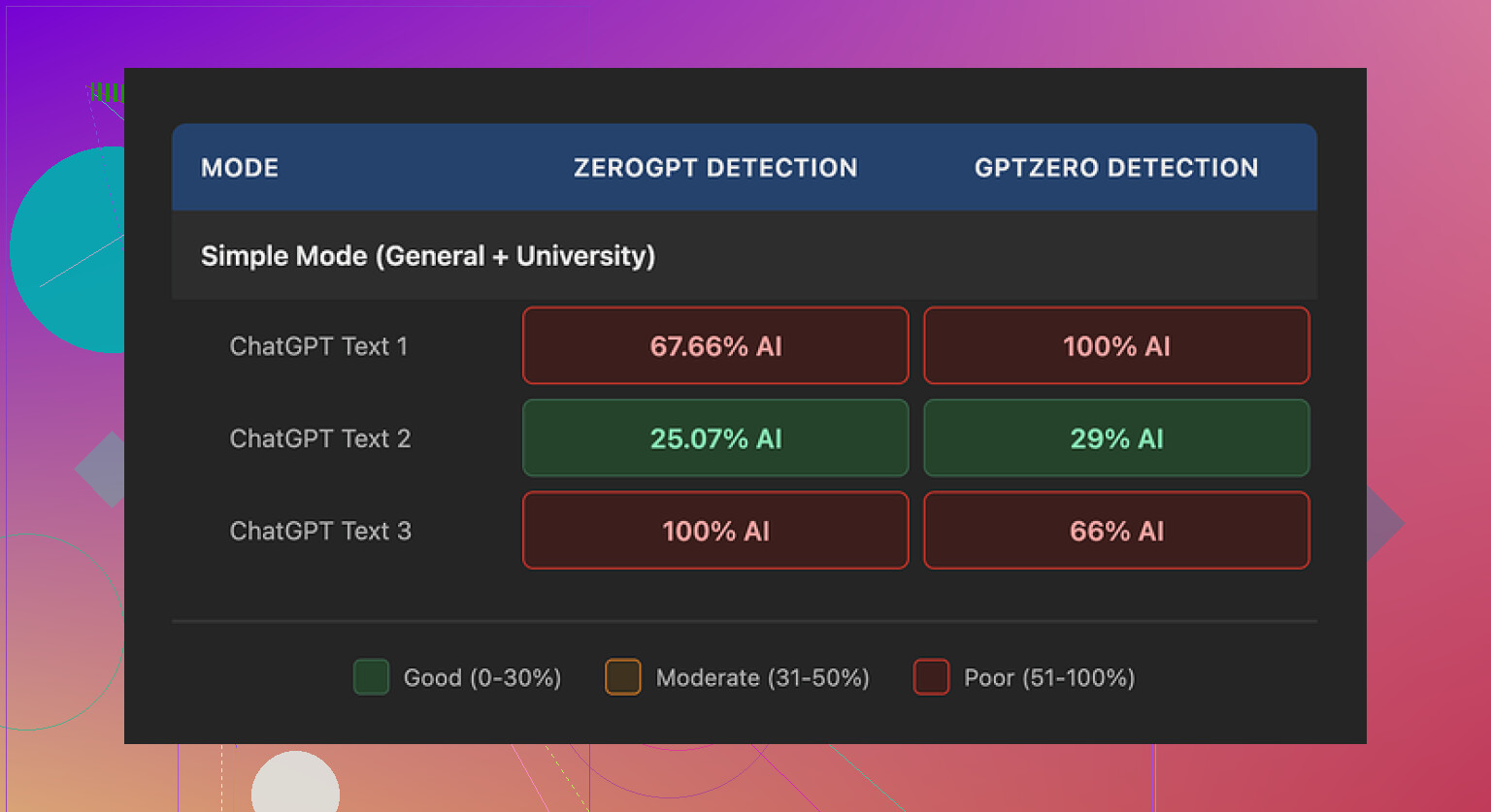
I used the free tier, Simple mode only, so keep that in mind.
I ran three different samples through detectors:
• One sample looked surprisingly decent. GPTZero said 29 percent AI, ZeroGPT said 25 percent AI. For a free humanizer tier, that is on the higher end of what I usually see.
• The other two samples went straight to 100 percent AI on at least one detector. No middle ground, it either passed fairly well or completely tripped the alarm.
They say paid users get Standard and Enhanced bypass modes, which I did not test. I would not assume those are magically better without seeing hard numbers on multiple detectors.
The writing quirks were the part that bothered me more than the detector scores.
In several outputs I saw:
• Semicolons shoved in where a normal person would use a comma or a full stop. It looked stiff.
• The word “today” spammed four times across three short sentences in one sample. Once or twice is fine, four times looks like a pattern.
• Parenthetical examples like “(e.g., storms, droughts)” repeated across different paragraphs. Same structure, same vibe, felt like a template.
If you paste that into anything longer, it starts to read like the text was assembled from parts instead of written by someone with a clear voice.
Pricing details from their site when I checked:
• Starter, $8 per month on an annual plan, 30,000 words.
• Unlimited, $26 per month, but each submission is capped at 2,000 words. So “unlimited” means you keep feeding it smaller batches.
• Free tier gives you a total of 300 words to work with, which you burn through fast if you test more than a paragraph or two.
The refund section also made me stop and reread. It included strong language about chargebacks and threatened legal action in disputes. Not something I see often on small SaaS tools and it does not inspire much confidence.
On top of that, their data retention wording around submitted text felt vague. I did not get a clear, specific answer on how long they store your content or how it is used later. For anything sensitive or client related, I would hesitate.
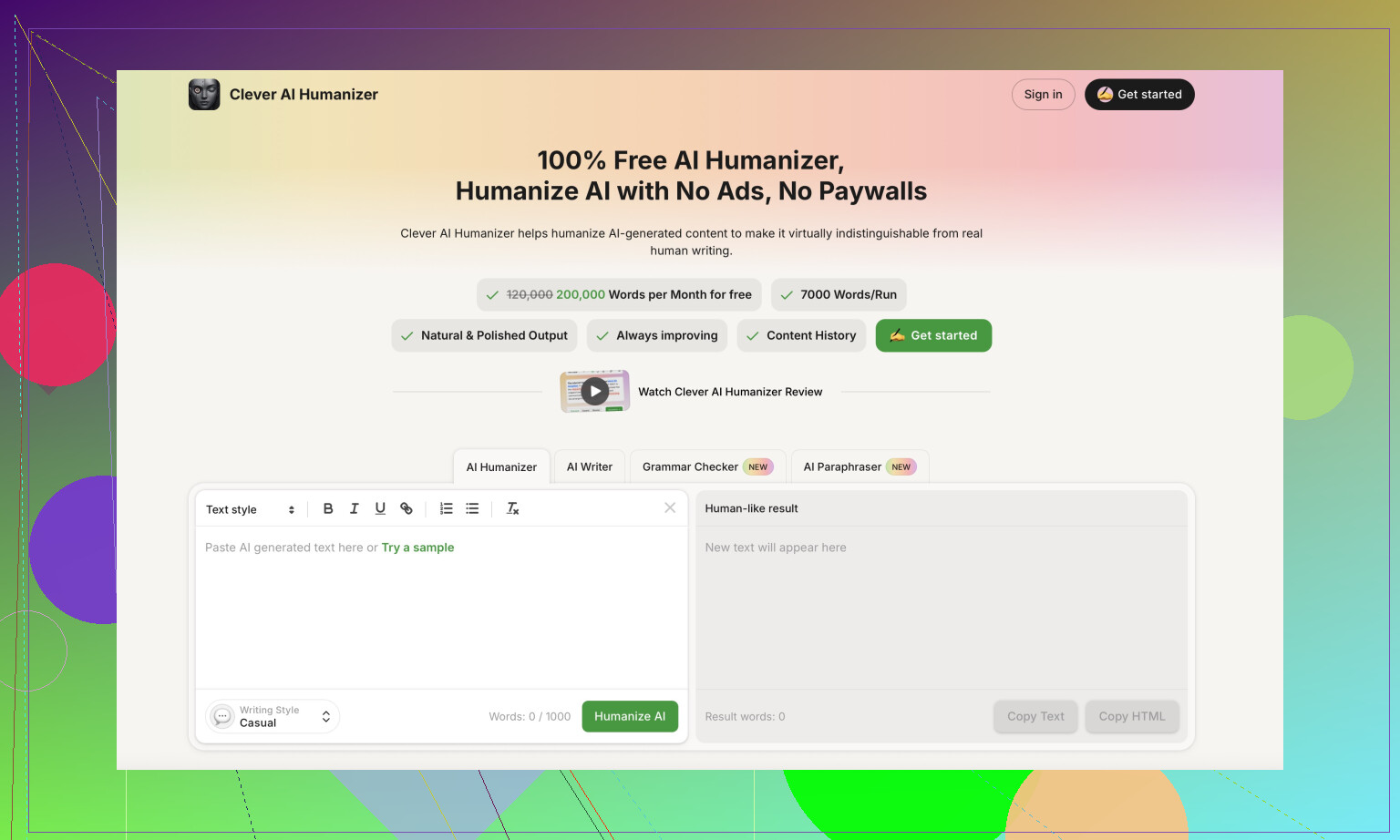
For comparison, while testing other tools for the same job, I kept going back to Clever AI Humanizer. It produced output that sounded closer to how people write, and I did not have to put in a card or pay to get something usable. You can try it here:
If you want more context and user experiences, these helped:
Humanize AI tutorial on Reddit (walkthrough style, with some detector tests in the comments):
https://www.reddit.com/r/DataRecoveryHelp/comments/1l7aj60/humanize_ai/
Clever AI Humanizer review thread on Reddit (people posting before and after samples):
https://www.reddit.com/r/DataRecoveryHelp/comments/1ptugsf/clever_ai_humanizer_review/
YouTube video review if you prefer watching someone else test it:

If you only need a small amount of text and you are comfortable editing the output by hand, Walter’s free tier is fine for experiments. For anything serious, I would want clearer data policies, less aggressive legal copy, and more consistent detector performance before putting money into it.
1 Like
Short version. If you want a reliable writing tool for paid work, Walter Writes AI is a hard sell right now.
I played with it on a paid plan for a week, not only the free tier like @mikeappsreviewer. Here is what stood out.
Pros
-
Output variety
Simple mode and the higher modes do shift the tone a bit. For short blog sections or social posts, you get ok raw material.
I got a few decent 600 word posts about SaaS tools with minimal prompts. -
Speed
It responds fast. For quick drafts, it keeps up. -
Basic UI
Clean, no fluff. You type, you get text. No complex workflow.
Cons
-
Consistency is weak
Detector scores jumped all over the place for me too, but I care more about readability.
Some outputs looked fine. Next run with similar prompts looked like a high school essay from 2009.
I saw repeated phrases across different articles, like “in today’s digital age” and “on the other hand” spammed in multiple paragraphs.
If you publish often, your content will start to look cloned. -
Voice and style problems
It leans into generic “bloggy” language.
I had to rewrite intros and conclusions almost every time to remove fluff and repetition.
If you want brand voice or niche tone, you will do a lot of manual editing. -
Word limits and workflow
That 2,000 word per submission cap gets annoying fast if you write long form content.
Long guides mean you babysit it, section by section. That kills any time savings. -
Policy and refund red flags
I read the same refund terms and data language you mentioned.
The aggressive chargeback text plus vague data retention is a bad combo, especially if you work with client content.
I would not run anything sensitive through it. -
Value compared to alternatives
At around 26 dollars per month for “unlimited” in small chunks, the value is questionable.
For “humanizing” AI text, Clever AI Humanizer gave me cleaner, more natural output, especially when I ran sample paragraphs from GPT style models.
I pushed some of those through GPTZero and Originality detectors. They still flagged as AI sometimes, but the writing sounded more like a real person and needed less fixing.
Where I disagree a bit with @mikeappsreviewer is on the free tier being “fine” even for experiments. With only 300 words total, you burn it in minutes and you do not get a fair view of the tool. It feels like a teaser, not a test.
Practical advice from using it:
• Use Walter Writes AI only if
– You need quick, disposable drafts for low stakes content, like internal notes or idea outlines.
– You plan to rewrite heavily.
– You do not care much about policy language.
• Avoid it if
– You work with clients or anything sensitive.
– You want stable style and voice across many posts.
– You want a strong AI detector bypass. It is hit or miss.
If your main goal is to humanize AI text for blogs or school, try Clever AI Humanizer with your own samples. Run the before and after through a couple detectors and, more important, read them aloud. You will see fast which one sounds more like you.
For pure content creation, you might get better value from a general AI writer plus a humanizer on top, rather than paying Walter for both in one package that does neither part consistently well.
I’m mostly in the same camp as @mikeappsreviewer and @voyageurdubois, but I’ll add a slightly different angle from using tools like this for client work.
Short version: Walter Writes AI can be useful, but only in a pretty narrow use case.
Where it actually worked for me
- Decent for rough brainstorming: outlining article sections, generating a few alternative intros, or spinning a boring paragraph into 2–3 variants. If you treat it like a disposable “idea generator,” it’s fine.
- Speed is legit. If you just need to fill a blank page with something you’ll rewrite anyway, it does that job quickly.
Where it fell apart
- Style fatigue: After a few pieces, I could tell which paragraphs came from it without checking. Same kind of generic “blog voice,” similar phrasings, and that overused “in today’s world / digital age” type stuff both of you already flagged. If you’re trying to build a recognizable brand voice, you’ll end up rewriting half of it, which kills the value.
- Long-form workflow is painful. That 2,000 word cap per submission sounds ok on paper, but in practice it means you keep chunking and then stitching text together, then fixing transitions so it doesn’t read like 5 separate mini posts.
- Policy language is a real concern, not just paranoia. The aggressive refund / chargeback wording plus the fuzzy data-retention language is exactly the combo that makes agencies and freelancers nervous about sending client material through it. I don’t think this is nitpicking; it’s a legitimate business risk.
Where I slightly disagree with them
- I don’t think the free tier is even “fine” for testing, honestly. With only 300 words, you basically get a glimpse of its best scenario (short-form, simple prompt) and none of its weak spots (consistency over multiple long pieces, repetitive structures, etc.). So if you are trying to decide “is this worth paying for,” the free tier is a pretty misleading sample.
- Detector obsession is overrated. I care more about whether text sounds like a real human than whether one random tool gives it 15% or 40% AI. Walter’s inconsistency on detectors is annoying, but its bigger problem is that you can feel the templated structure in a lot of its outputs.
How I’d actually use it (if at all)
- Low stakes internal stuff: meeting notes, quick summaries, messy drafts you’ll rewrite anyway.
- Never for contracts, sensitive docs, or anything tied to legal or compliance due to the unclear data policies.
- Definitely not as a one-stop solution for “write full blog posts I can lightly edit and publish.”
If your real goal is:
- write with a more natural, human tone, and
- reduce how often detectors scream “100% AI,”
then something like Clever AI Humanizer plus a strong general AI writer works better. You generate your main content with whatever model you like, then run paragraphs through Clever AI Humanizer and edit on top of that. In my experience, that combo leads to text that reads more like you, with less of the cookie-cutter blog feel that Walter keeps falling back to.
So is Walter Writes AI “worth paying for”?
- For casual, disposable drafting: maybe, if you really like the interface and don’t care about the policy stuff.
- For serious content creation, client work, or anything where voice, consistency, and data handling matter: I’d pass for now and lean on a solid writer + something like Clever AI Humanizer instead.