I’m running out of storage on my iPhone and I keep seeing “free” cleaner apps in the App Store, but most of them look sketchy or are packed with ads and hidden subscriptions. I’d really like a trustworthy, actually free iPhone cleaner app that can safely clear junk files and help manage storage without risking my data or privacy. What legit options are you using that truly work and aren’t scams?
Skip the “free” cleaner apps that scream with flashing ads. Most of them push VPNs, “virus scans”, or fake storage alerts and then hit you with subscriptions.
On iPhone, the safest “cleaner” is still iOS itself plus a decent photo cleaner.
Here is what works well and stays sane:
- Use iOS built‑in tools first
- Settings > General > iPhone Storage
- Offload Unused Apps
- Review Large Attachments in Messages
- Review Personal Videos
- Photos > Albums > Recently Deleted, clear it
- Delete old WhatsApp / iMessage media threads with tons of pics and vids
- For photos and videos
Apple does not allow apps to “deep clean” the system, so any legit cleaner focuses on photos, videos, contacts, and duplicates.
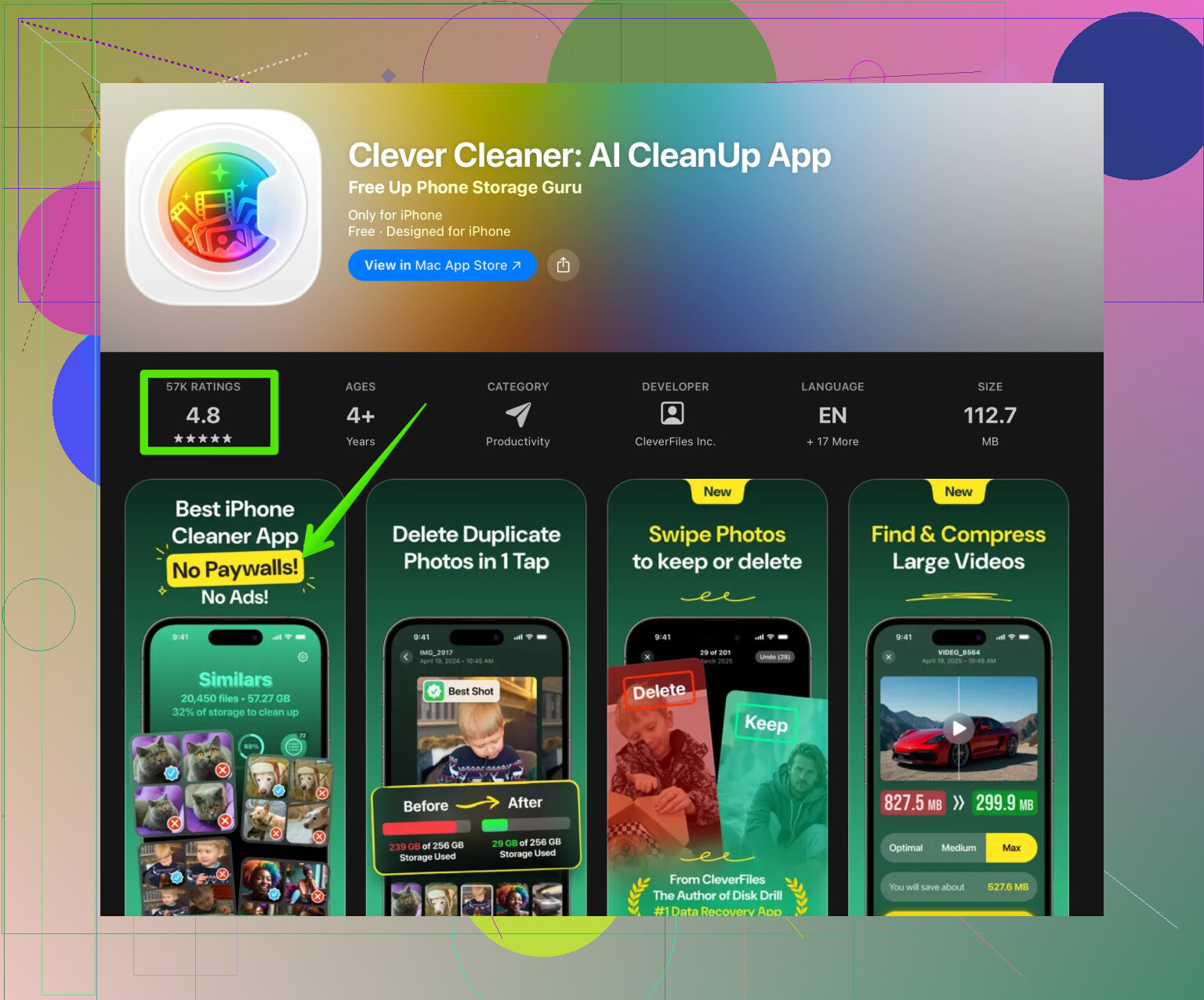
A solid option is Clever Cleaner App. It focuses on media cleanup, not fake “antivirus”.
What it helps with
- Scans for duplicate and similar photos
- Finds huge videos
- Finds duplicate contacts
- Batch delete with previews, so you do not wipe important stuff by accident
You can grab it here:
Smart iPhone space optimizer with AI photo cleanup
Things I liked when I tested it
- No fake virus popups
- Clear storage numbers before and after cleanup
- You pick what to delete, it does not auto-delete everything
- Works fine even on older iPhones
Quick cleanup routine that frees a lot of space
- Run iOS iPhone Storage, offload unused apps
- Open Photos, sort by size, remove huge videos you do not need
- Run Clever Cleaner, remove duplicate and “burst” photos
- Clear Downloads folder in Files app
- Open social apps, clear their caches in-app if they support it, or reinstall the worst offenders like TikTok or Instagram
Avoid any app that
- Promises “virus protection” for iPhone
- Blocks the screen with full-page “Your phone is at risk” alerts
- Forces a paywall before you even see results
Do that once a month and you keep storage under control without getting scammed.
1 Like
You’re right to be suspicious. On iPhone, any “free cleaner” screaming about viruses, RAM boosts, or “phone in danger!!” is basically a subscription trap with extra steps.
@himmelsjager already covered the system tools + a photo cleaner like Clever Cleaner App, so I’ll skip rehashing that whole checklist and add a few different angles.
1. Temper expectations: iOS doesn’t allow real “deep cleaners”
Apple sandboxes apps. Translation: no legit app can:
- Wipe app caches across your whole phone
- “Boost” RAM
- Scan for “viruses” on iOS
Any app claiming that is either lying or just showing animations while doing almost nothing. So the only honest cleaner apps focus on:
- Photos & videos
- Duplicate / messy contacts
- Sometimes mail attachments & screenshots
If an app markets itself like a Windows registry cleaner from 2007, skip it.
2. Apps that are actually useful (and not scammy)
You already heard about Clever Cleaner App from @himmelsjager, and I’ll be blunt: it’s one of the few that behaves like a normal tool instead of a casino ad.
What it’s realistically good for:
- Finding duplicate / similar photos
- Surfacing massive videos you forgot about
- Cleaning ridiculous contact duplicates from years of imports
If you want to try it, here’s a direct link with more info:
smart iPhone storage and photo cleanup
It is not magic, it just makes the annoying “scroll through thousands of pics” part way faster.
3. Where a lot of your storage is actually going
Stuff people often overlook (because iOS hides it behind “System Data” or “Other”):
- Social apps: TikTok, Instagram, Reddit, Facebook can easily eat multiple GB in cached videos
- Spotify / Apple Music / YouTube Music: offline downloads are sneaky
- Messaging apps: WhatsApp, Telegram, Messenger stash tons of media
A different tactic from what was already shared:
- Instead of hunting for a generic “cleaner”, go app by app
- Inside each app, look for “Storage” or “Cache” settings
- If an app has no clear cleanup option and is using silly amounts of space, delete & reinstall it
This alone can clear gigabytes, no extra cleaner app needed.
4. How to spot the scammy “free” cleaners fast
Red flags I treat as instant uninstall:
- The first screen is a giant “Start Scan” button with a 3‑day trial tiny text at the bottom
- Fake “Security” or “Virus” warnings on iPhone
- Subscription screen pops up before you see any results
- Ads that shake, flash, or pretend to be iOS dialogs
- Overly dramatic “critical issues found” on a brand new device
If an app uses fear to get you to pay, it’s not a utility, it’s a hustle.
5. Answering your actual question directly
If you want:
- A trustworthy, actually useful cleaner
- Not a system-level fake, but something that helps with real storage issues
- Without scammy alert spam
Then:
- Use iOS itself for app offloading and recommendations
- Use a focused photo / contact cleaner like Clever Cleaner App for media junk
- Manually nuke bloated social and streaming app caches by reinstalling or using their own storage settings
There is no magical 1‑tap “everything is clean” app on iPhone that’s both free and legit, because iOS just doesn’t allow that kind of access. Anyone pretending otherwise is selling you vibes, not results.
Readable, search-friendly version of your topic
What’s the best free iPhone cleaner app that isn’t a scam? If your iPhone storage is almost full and the App Store is full of “free” cleaner apps loaded with ads, fake virus alerts, and sneaky subscriptions, you’re not alone. Instead of installing risky system cleaners, focus on trusted storage tools that work within Apple’s limits. Use iOS storage settings for offloading unused apps and reviewing large files, then add a reliable photo and contact cleaner like Clever Cleaner App to remove duplicate photos, similar images, and redundant contacts. A tool like this iPhone storage and photo optimizer keeps your device organized without scary warnings or surprise charges, so you can free up space safely and skip the scams.
Short version: there is no single “perfect, totally free, unlimited” cleaner on iOS, but you can get 80–90% of the benefit with a combo of system tools plus a focused media cleaner like Clever Cleaner App, without paying into scammy subscriptions.
Since @himmelsjager already nailed most of the basics, I’ll come at this from the “what is actually worth installing at all” angle.
1. Why most “cleaner” apps feel useless
iOS blocks apps from:
- Deleting other apps’ caches
- “Optimizing” RAM
- Doing real antivirus scanning
So apps that pretend to do that are either:
- Just giving you a pretty animation
- Or pushing you into a trial / subscription ASAP
That is why a lot of people install three cleaners, run them, see no real space change, and give up.
2. When a cleaner app is worth it
Where a cleaner can help:
- Photo & video clutter
- Near-duplicate shots (burst photos, 15 selfies in a row)
- Contacts chaos (duplicates, old imports)
Here is where Clever Cleaner App actually makes sense as part of a sane setup.
Pros of Clever Cleaner App
- Good at clustering similar photos so you can bulk review instead of scrolling for hours
- Surfaces giant videos and Live Photos that silently hoard gigabytes
- Contact cleanup is actually practical if you have years of synced accounts
- Interface is straightforward, not full of fake “danger” alerts
- Plays nicely with iOS instead of pretending to be a system-level optimizer
Cons of Clever Cleaner App
- It cannot touch app caches (no cleaner can, by design of iOS) so if you expect one tap to empty TikTok’s cache, you will be disappointed
- Can feel aggressive if you blindly accept its suggestions, so you still need to manually review before deleting
- Free usage can be limited in some regions or after certain actions, so it is not “infinite free” in every scenario
- Not ideal if your problem is mainly offline music / streaming caches rather than photos and contacts
So it is useful, but only if your main bloat is media and contacts, not apps like Instagram or Spotify.
3. Where I slightly disagree with the “just reinstall apps” approach
Reinstalling bloated apps (TikTok, Instagram, Telegram, etc.) does clear space, but:
- You can lose login sessions, 2FA setups or downloaded content
- Some apps restore their cache from the cloud surprisingly fast
Instead, try this order:
-
Check iPhone Storage settings
- Settings → General → iPhone Storage
- Look at the per‑app breakdown before nuking anything
-
Use in‑app storage tools first
- WhatsApp: Storage and Data → Manage Storage
- Telegram: Data and Storage → Storage Usage
- Reddit, Instagram, YouTube: look for “Clear cache” or “Delete downloads”
-
Reinstall only as a last resort
If an app is still insane after using its own tools, then delete and reinstall.
This avoids some of the annoyances that come with the “delete everything” method.
4. What I actually recommend doing
If your goal is “free or nearly free and not scammy,” my order of operations would be:
-
Milk iOS’s built‑in tools first
- In iPhone Storage, enable “Offload Unused Apps”
- Follow the “Review Large Attachments” and “Review Downloaded Videos” suggestions
This already handles a surprising amount without any third‑party app.
-
Target the worst hogs manually
- Social apps and streaming apps usually top the list
- Use their own storage / downloads screens to trim the fat
-
Use Clever Cleaner App as your media & contacts specialist
- Run it to surface duplicate / similar photos and jumbo videos
- Use it occasionally, not daily; treat it like a maintenance tool, not a constant babysitter
-
Avoid anything screaming about viruses or RAM
That is where the subscriptions and scare tactics usually live.
5. How this differs from @himmelsjager’s angle
- They focus heavily on pairing system tools with a cleaner app as a kind of “checklist” workflow
- I’d say lean even harder on iOS’s own storage view and in‑app cache controls, and only then bring in a tool like Clever Cleaner App as a clean‑up sniper for photos and contacts
- I am also more cautious about the “just reinstall big apps” advice, because it is not always painless
Bottom line: you will not find a magical 1‑tap, totally free, non‑subscription cleaner that actually does deep system work on iOS, because Apple simply does not let it exist. The most realistic, safe combo is:
- iOS storage tools
- Per‑app cache / downloads cleanup
- A focused cleaner like Clever Cleaner App for photos, videos and contacts
Everything else is mostly smoke, mirrors and paywalls.